
TEI Encoding: Preparing Texts for Programmable Corpora#
Warning
This chapter is a draft. It has not yet been proofread or formally reviewed. Content, terminology, and examples may change.
Chapter metadata
Authors: Julia Jennifer Beine; Daniil Skorinkin
Version: 0.3 (2026-07-10)
Review status: in progress
Planned reviewers: Antonio Rojas Castro and another member of the DraCorOS editorial team of the DraCor Textbook editorial team
1. Overview#
In this chapter, we elaborate on the individual parts of the DraCor corpora, the encoded text files. We introduce the basics of encoding dramatic texts in eXtensible Markup Language (XML) for DraCor, following the Guidelines for Electronic Text Encoding and Interchange by the Text Encoding Initiative (TEI). Subsequently, we discuss various methods of supporting and automating the encoding process. Moreover, we show how TEI encoding is central to the concept of programmable corpora.[1]
2. Requirements and Competences#
Basic familiarity with dramatic text structures required.
Web browser and internet access required.
XML editor required, preferably the Oxygen XML Editor.
3. Learning Outcomes#
After completing this chapter, learners will be able to:
Describe what a TEI file is.
Describe and employ the general principles of encoding dramatic texts in DraCor TEI.
Describe different methods of text encoding in TEI, including (semi-)automatic methods.
Encode frequent elements of dramatic texts in TEI manually.
Encode frequent elements of dramatic texts in TEI semi-automatically using EzDrama.
Discuss the approach of semi-automatic encoding of dramatic texts with an LLM by generating a TEI-encoded version of a dramatic text via this approach and reflecting upon the result.
4. Theoretical Background#
4.1. XML Basics#
The eXtensible Markup Language (XML) is a method for marking up texts and encoding information. When using XML, so-called markups or encodings are added to a text [VS17, p. 128]. For instance, in the case of dramatic texts, titles, cast lists, character speeches, or stage directions may be marked up as such. This way, markups in XML make the structure of a dramatic text visible and enable the information to be processed digitally [VS17, p. 128]. If multiple texts are marked up following the same encoding schema, they may be processed and analysed similarly. In fact, this feature of XML encoding is what basically makes the DraCor corpora “programmable” [FBornerGobel+19]. We will explain this step by step.
XML is a rather user-friendly format. Markups in XML use the same character system used in the text itself, often Unicode (UTF-8). Therefore, both humans and machines can read XML [VS17, p. 128]. Moreover, XML markups have a very prominent feature you may spot in the following example. In the first picture, you may see the formatted text from the opening of Shakespeare’s Macbeth, translated by Dorothea Tieck, and in the second picture, the related XML file [Shant]:
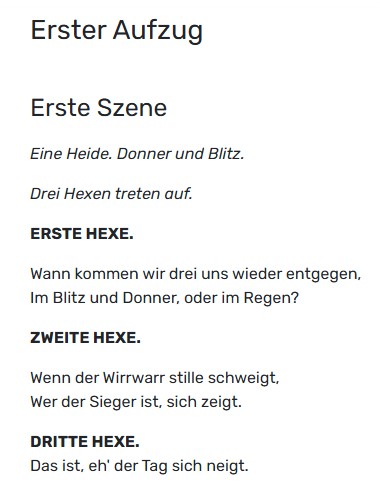
Fig. 2 The formatted text from the opening of Shakespeare’s Macbeth translated by Dorothea Tieck in the DraCor full text view.#
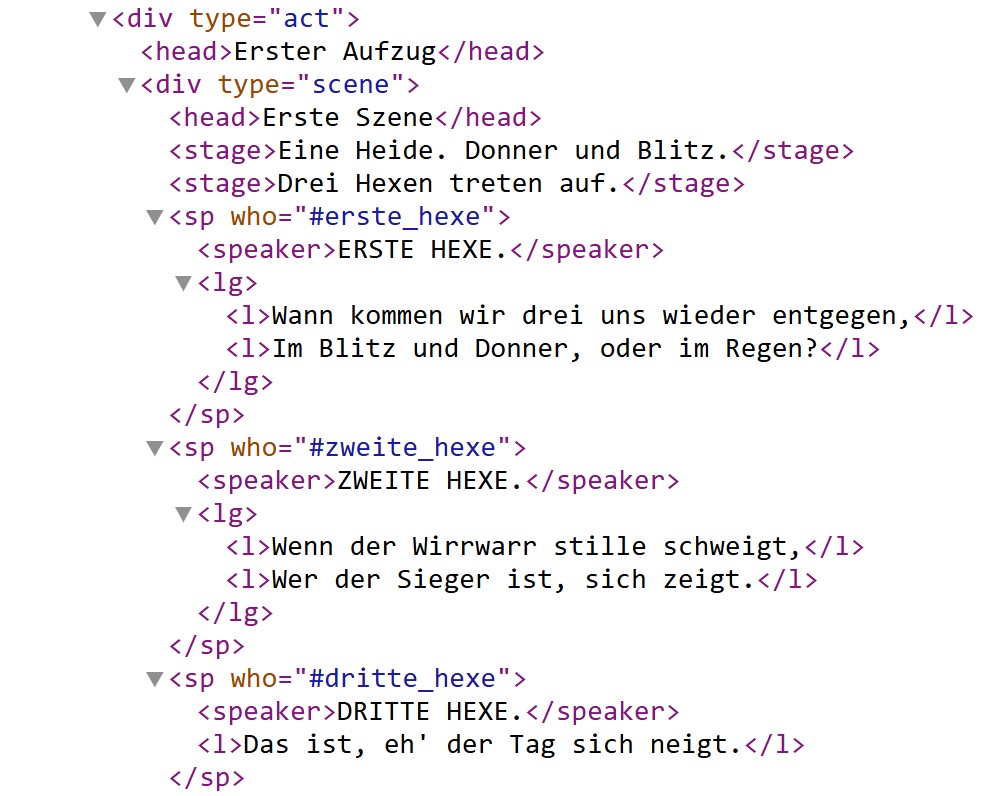
Fig. 3 The XML file on which the DraCor full text view is based.#
As you may see, XML markups are enclosed in angle brackets to distinguish them from the text being encoded:
<markup>text</markup>
In the markup area, so-called tags are given. There is always a start-tag (<tag>) and an end-tag (</tag>):
<tag>text</tag>
In our example above, you may find the following tags: <div>, <head>, <stage>, <sp>, <speaker>, <lg>, and <l>.
The unity of the start-tag, the contained text, and the end-tag is called an element. Elements can contain text or other elements. In our example, the first <sp> element contains 1 <speaker> element as well as 1 <lg> that includes 2 <l> elements, which themselves contain parts of the dramatic text.
Elements may be further specified by so-called attributes, see the following example from Macropedius’ Neo-Latin play Hecastus (Everyman) [Mac]:
<foreign xml:lang="grc">ὡς τὸν ἔπὶ φακῇ μῦθον</foreign>
While most of the play is written in Neo-Latin, this passage is written in Ancient Greek, which is marked up as a <foreign> element. The attribute @xml:lang has the value grc, the language code for Ancient Greek, and, thus, further specifies the <foreign> element.
As you may have noticed, XML elements are always nested. Each element has to be completely contained by another element, except for the root element. The root element contains all other elements at the highest level. Moreover, elements are sorted hierarchically and sequentially and must not overlap. This nesting of the elements creates a tree structure, with the elements being called nodes [VS17, p. 130-131]. You may also think of an XML document as a box that contains a smaller box that contains a smaller box, and so on. If all the XML rules are followed, an XML document is called well-formed [VS17, p. 131].
After describing the basics of the XML markup procedure, we would like to elaborate on the “X” in “XML”, which stands for “extensible”. This means that elements or tags may be ‘invented’ if certain general rules are considered [VS17, p. 133]. This feature results in a certain openness of XML for further development and enrichment. At the same time, if XML files marked up by different persons are supposed to be interoperable and reusable, standards for XML files are required, especially in research. Hence, different markup guidelines for XML files have been developed. For the humanities, a common standard is the Guidelines for Electronic Text Encoding and Interchange by the Text Encoding Initiative (TEI).
4.2. TEI Basics#
The TEI is an international organisation, founded in 1987. In 1994, the TEI began to officially publish their Guidelines for Electronic Text Encoding and Interchange [tei26b, tei26c]. XML files that follow these guidelines are also called TEI files. Thus, the abbreviation “TEI” may refer to three things: the organisation, the guidelines, and data files.
The TEI Guidelines are structured in different modules [tei26c]. Since the TEI guidelines aim to cover as many text features as possible, the modules cover poetic texts, performance tests, dictionaries, manuscripts, figures, and more. Therefore, it is crucial to carefully select the modules relevant to the text(s) to be encoded. This process is called customisation. It may be supported by the Roma tool by the TEI [VSW26]. The customisation results in a specific validation schema. It provides rules for how to use all elements and attributes correctly. If all rules are followed, the TEI file validates against the validation schema, and the TEI file is valid.
In fact, the editorial team of DraCor has created such a validation schema by customising the TEI guidelines. The DraCor schema is not static, but is maintained and further developed by the DraCor editorial team in exchange with the whole DraCor community. The work on the DraCor schema is conducted on GitHub [dra26d]. Moreover, it is documented in the DraCor ODD, also accessible via the DraCor front-end [BBornerF+26].
The basic structure of a DraCor TEI file is as follows. The root element of a DraCor TEI file is the <TEI> element. It then includes a <teiHeader> element that provides the metadata on the file, such as its encoders and its text sources. Subsequently, the <text> element includes the dramatic text and its paratexts. Within the <text> element, the <body> element contains the dramatic text itself. Paratexts, such as a preface, a list of the dramatis personae, or an afterword, are encoded in a <front> element that precedes the <body> element, or in a <back> element that follows the <body> element, depending on their position in the digital source or source text edition. The basic structure of a DraCor TEI file, hence, may be outlined as follows.
<TEI xmlns="http://www.tei-c.org/ns/1.0" type="dracor" xml:id="XXXXXXXXX" xml:lang="XX">
  <teiHeader>
  [...]
  </teiHeader>
  <text>
    <front>
    [...]
    </front>
    <body>
    [...]
    </body>
    <back>
    [...]
    </back>
  </text>
</TEI>
Note that the <TEI> element is specified by the @xmlns attribute, which defines the default namespace. The namespace indicates a set of XML tags used in the file, in our case, the tags defined in the guidelines of the Text Encoding Initiative [tei26a].
Regarding the dramatic text, the most frequent elements are <div>, <head>, <sp>, <speaker>, <l>, <p>, and <stage>. The <div> element contains divisions or segments of the text, such as acts or scenes. Accordingly, it may be specified by the @type attribute, e.g. <div type="scene">. The <head> element contains any type of heading. Regarding character speech, the speaker information is marked up as a <speaker> element. The spoken text itself is marked up with <l> for “verse line” in poetic dramas, and with <p> for “paragraph” in dramas in prose. Both the speaker information and the character speech are marked up as a <sp> element, standing for “speech”. Each <sp> element is specified by an @who attribute that links the speech to a specific character via their speaker ID. The speaker ID is assigned to each character in the <teiHeader> element, more precisely, in the <particDesc> element. This way, a speech may be attributed to the correct character, even if the speaker information given in the text may be irregular or include typos. For illustration of these common elements, see the following example from Goethe’s Faust from the German Drama Corpus (GerDraCor) [Goe].
<div type="scene">
  <head>Marthens Garten.</head>
  <stage>Margarete. Faust.</stage>
  <sp who="#gretchen">
    <speaker>Margarete.</speaker>
    <l>Versprich mir, Heinrich!</l>
  </sp>
  <sp who="#faust">
    <speaker>Faust.</speaker>
    <l>Was ich kann!</l>
  </sp>
  [...]
</div>
Now we turn to the processing of TEI files. First of all, TEI/XML files may be parsed and processed, for example transformed into a specific presentation such as the DraCor full text view (see Chapter 4, “Front-End: Navigating DraCor”). However, we are more interested in how we may process TEI markups in digital analyses. If multiple texts are validating against the same schema, they may be analysed similarly. In the case of DraCor, you may analyse a specific text feature throughout one corpus. For instance, you may analyse all speeches by male characters vs. all speeches by female characters in the Italian Drama Corpus (ItaDraCor) or all stage directions in GerDraCor. What is more, as all the DraCor corpora adhere to the same guidelines, you may investigate a text feature or phenomenon not only in one DraCor corpus, but in all DraCor corpora, if relevant to your research question. This is why TEI markups make the DraCor corpora programmable. At the heart of the processing of the DraCor TEI-encoded corpora is the DraCor API [dra26a, dra26b], which allows multiple approaches to the DraCor texts for analyses (see Chapter 5, “API: Working with DraCor Programmatically”). A snippet of these research possibilities is suggested via the download tab for each drama in the DraCor front-end [fis] (see Chapter 4, “Front-End: Navigating DraCor”). Each file you may download is the result of some kind of TEI processing. After outlining the research potential of TEI files, we will discuss the process of TEI encoding itself.
4.3. TEI Encoding#
4.3.1. Overview of Encoding Strategies#
The dramatic texts that are encoded for DraCor may come from different sources and in different markup stages. Accordingly, different texts may suggest different encoding strategies.
First, an encoder may face a dramatic text without any markup, e.g., a plain text in TXT format from a PDF processed via Optical Character Recognition (OCR). In this case, they may encode the text manually in an XML editor. If they use the Oxygen XML Editor [oxy], their encoding process may be supported by the DraCor Oxygen Framework [dra26c]. Nonetheless, the manual approach is quite time-consuming. Encoders may also use an intermediary markup tool, such as EzDrama (Easy Drama) [drant], employing a semi-automatic approach. A showcase for this approach is the Ukrainian Drama Corpus (UDraCor) []. Most recently, Invisible XML is emerging as a new intermediary markup procedure [Pem22].
Second, an encoder may work with a dramatic text with some basic markup. This markup may be HTML markup when accessing texts on websites. Also, DOCX files may include markup in the form of a certain way of formatting, e.g. when speaker information is given in bold, stage directions in italics, or similar – the given markup can be as basic as that. In this case, the encoder may write a transformation script in a language of their preference, such as Python, R, or similar.
Third, an encoder may assess a dramatic text with advanced markup, such as XML files. In this case, they may also write a transformation script in a language of their preference. If the dramatic text is already available in an XML file, the transformation may be best conducted via an XSLT script (EXtensible Stylesheet Language Transformations) or via an XQuery script (XML Query Language). Showcases for this approach are the English Drama Corpus (EngDraCor) and the French Drama Corpus (FreDraCor) [GDraCorteamnt, MFGobelnt].
In the second and third cases, the automatically generated TEI files may be revised in an XML Editor, if necessary. In the Oxygen XML Editor, the DraCor Oxygen Framework may be employed for this step.
Tip for revising TEI files
Note that to this date, most (semi-)automatic encoding workflows require revising the generated text file. The revision may be supported by version control, i.e. saving the different versions of the text created throughout the encoding process, to be able to track changes, e.g. by using git. Versioning may also support collaborative encoding workflows.
Given the rapid development of Large Language Models (LLMs), encoders may consider whether and how to use them during the encoding process. For instance, they may be used to write a transformation script. Encoders may also let LLMs encode the dramatic text itself directly. However, they should be aware of the strengths and weaknesses of LLMs and design an evaluation process for texts encoded by LLMs. Moreover, they should be aware of the financial and environmental costs of LLM usage and questions of AI ethics. A showcase for this approach is the Lacy Drama Corpus (LacyDraCor) [Bur26a, Bur26b].
In the following sections, we will elaborate on selected scenarios of manual and semi-automatic encoding, especially considering the different markup stages of dramatic texts.
4.3.2. Manual Encoding in the Oxygen XML Editor#
An encoder may mark up a drama manually in XML editors, such as the Oxygen XML Editor [oxy]. The Oxygen XML Editor provides three modes: text, grid, and author. In the text mode, the encoder may work directly with the text; in the grid mode, they may examine the structure and nesting of their file; and in the author mode, they may see the text in a basic layout. Most of the encoding is probably done in author mode, with the other modes allowing checking the overall structure of the encoded text. In the author mode of the Oxygen XML Editor, the encoding process is supported in various ways. For instance, it gives explanations on the used tags via a mouseover or suggests suitable attributes and attribute values for an element. It also gives error messages when the encoding does not adhere to the TEI rules.
Furthermore, the Oxygen XML Editor offers a find-and-replace function that allows encoders to work with regular expressions (“regex”). Using this function, encoders may mark up multiple passages of the dramatic text at once. For instance, they may encode a regular speaker attribution throughout the whole text, such as “OPHEL.”, as <speaker>OPHEL.</speaker>.
Regular expressions may stand for certain patterns in the text. For example, an encoder may select a passage with verse lines that are supposed to be encoded as <l> elements. They may then search for ^(.+)$ and replace the findings with <l>\1</l> for the selected lines. In the find field, ^ stands for the beginning of a line, (.+) represents a group of one or more characters, and $ stands for the end of a line. In the replace field, \1 stands for the findings. Thus, although the contents of the selected verses may be different, their similar pattern enables encoders to mark them up all at once. The Oxygen XML Editor team gives some information on regular expressions on its website [SyncroSSRL26].
You may also work with LLMs to get more familiar with regular expressions and the possibilities of the find-and-replace function in the Oxygen XML Editor. E.g., a prompt may look as follows:
I mark up a text in the Oxygen XML Editor in TEI/XML. I would like to use the find-and-replace function and regular expressions in the process. The first scenario is:
Find:
[fol. A2r, p. 3]
Replace with:
<pb n="fol. A2r"/>
<pb n="3"/>
I want to find all page numbers in the style of “[fol. …, p. …]” in the document. I want to mark up this information as two successive <pb> (“page beginning”) elements in two successive lines.
After “fol.”, one or more letters or numbers may follow. I want to keep “fol.” in the <pb> element. After “p.”, one or more numbers may follow. I do not want to keep “p.” in the <pb> element.
In the text, the information is always given in square brackets.
How do I use regular expressions here? Explain the elements of the regular expression in your answer.
When encoding a drama for DraCor in the Oxygen XML Editor, the DraCor Oxygen Framework may be installed as an add-on []. It provides templates for DraCor TEI files that include the most common elements, which may be enriched by the encoders. During the encoding process, the Framework also gives information on DraCor-specific markup procedures and related API processing (see Chapter 5, “API: Working with DraCor Programmatically”). Furthermore, the text file being encoded is regularly validated against the DraCor schema and sources of validation errors are highlighted. The DraCor Oxygen Framework, therefore, proves useful at all stages of the encoding process, e.g. also when checking a (semi-)automatically generated TEI file.
4.3.3. Semi-Automatic Encoding with a Regular Expression Transformation Script#
If the available text source of the DraCor TEI file to be created includes many regular patterns as described above, the encoder may also write a transformation script in a programming language of their choice, using regular expressions. For illustration, some dramas are written and typeset in ways regular enough to be parsed with pattern-matching rules. If all speaker names (and only speaker names) appear in capital letters on their own line, and all stage directions (and only stage directions) are enclosed in brackets, then a well-crafted regular expression transformation script can produce a reasonable first draft of the TEI encoding.
In practice, however, few plays are that consistent. A speaker name might occasionally appear in mixed case; a bracketed phrase might be a parenthetical remark within dialogue rather than a stage direction; act and scene headings might follow three or four different formatting conventions within a single text. Pure regex-based conversion works well as a starting point, but rarely produces clean output without manual correction.
4.3.4. Semi-Automatic Encoding with a Transformation Script#
Source texts of the DraCor TEI files sometimes already provide advanced structured markup – in the form of TEI/XML, non-TEI XML, or HTML with meaningful and consistent structure. In such cases, the encoding task is not to mark up a text from scratch, but to transform one structured representation into another, i.e. to convert the source format into DraCor-conformant TEI/XML. The tools for this kind of work are specialised transformation languages such as XSLT and XQuery, which are designed to traverse, restructure, and rewrite XML documents. Alternatively, the XML/HTML processing capabilities of general-purpose programming languages like Python or R can serve the same purpose.
These transformations are never purely mechanical. Even when both the source and the target file are nominally TEI/XML, the differences in encoding conventions, attribute usage, namespace declarations, and structural organisation can be substantial. A conversion script must handle inconsistencies in the source, normalise identifiers, restructure elements to match the DraCor schema, and flag cases that cannot be resolved automatically for human review. The result is a script that embodies a lot of domain knowledge about both the source corpus and the target format.
A showcase for this approach is FreDraCor. This corpus is derived entirely from Paul Fièvre’s “Théâtre Classique” project – a large collection of French dramatic texts that has been carefully maintained for over two decades [MFGobelnt]. The Théâtre Classique files already use XML with a structure that is close to TEI, making this a favourable case for automated conversion. Yet even here, the transformation is far from trivial. The XQuery script tc2dracor.xq handles the conversion [MFGobelnt]. Examining a fragment of the script reveals the kind of work that structured-source transformation involves.
We will focus on the transformation of the <sp> element. A <sp> element in a typical Théâtre Classique source file looks as follows:
<sp stage="together" who="CLITANDRE, ACASTE">
  <speaker>CLITANDRE et ACASTE.</speaker>
  <l id="733" part="f">Non pas, Madame.</l>
 </sp>
This example is taken from Molière’s Le Misanthrope, Act II, Scene 4, [Moliere] where Clitandre and Acaste speak in unison.
Several things about this are problematic from a DraCor perspective. The @who attribute – which identifies the speaking character(s) – is a raw, inconsistent string. Different plays in the Théâtre Classique corpus use different separators between multiple speakers: /, ,, or _. The values are in uppercase and may contain diacritics and special characters (e.g. MADAME D'ARGENT). There is no preceding #, which would make the value a proper XML data pointer – that is, a reference to an @xml:id defined elsewhere in the document. Furthermore, the @stage attribute does not belong to an <sp> element in standard TEI. And the element lacks a TEI namespace declaration.
The relevant fragment of the transformation script deals with precisely these issues:
case element(sp) return
  if( not(exists($node/* except $node/*:speaker)) )
  then comment { 'ERROR: ', serialize($node)}
  else
  element {QName('http://www.tei-c.org/ns/1.0', 'sp')} {
    $node/@* except ($node/@stage, $node/@who, $node/@type),
    attribute who {
      let $easy := tokenize(string-join($node/@who, ' '), $who-tokenize-pattern)
                        ! ('#' || local:translate(.))
      return
        if(string($easy[1]) != '')
        then $easy
        else
            '#' || (normalize-space($node/speaker) => local:translate())
    },
    local:transform($node/node() except $node/text())
  }
What the script does. The first check is a validation guard: if an <sp> element contains nothing except a <speaker> element (i.e. no actual spoken text – no lines, no stage directions), it is clearly malformed in the source. Rather than producing broken output, the script replaces it with an XML comment flagging the error for human review:
if( not(exists($node/* except $node/*:speaker)) )
then comment { 'ERROR: ', serialize($node)}
This kind of defensive programming is typical of conversion scripts that must handle a large corpus with irregular encoding practices. It ensures that problems are surfaced rather than silently propagated.
When the element is valid, the script constructs a proper DraCor <sp> element in the TEI namespace:
element {QName('http://www.tei-c.org/ns/1.0', 'sp')}
The QName(...) call explicitly creates the element in the TEI namespace – something the Théâtre Classique source documents often lack entirely. Next, all existing attributes are taken over into the DraCor TEI file except three that are either invalid in standard TEI or need special handling (@stage, @who, @type):
$node/@* except ($node/@stage, $node/@who, $node/@type),
The @who attribute is then rebuilt from scratch. This is the core of the transformation. The script tokenises the original @who value by splitting it based on one of the three possible separators (/, ,, _), as defined in the variable $who-tokenize-pattern:
let $easy := tokenize(
      string-join($node/@who, ' '), $who-tokenize-pattern
    ) ! ('#' || local:translate(.))
Each resulting token is passed through local:translate(), a function that lowercases the string, strips diacritics (converting “é” to “e”, “à” to “a”, and so on), and replaces spaces with hyphens – turning something like CLITANDRE into clitandre, or MADAME D'ARGENT into madame-d-argent. A # prefix is prepended to each token, making it a proper XML pointer, such as #clitandre.
If this parsing yields an empty result – meaning the @who attribute was absent or empty in the source – the script falls back to reading the <speaker> element and applying the same normalisation to its text content:
else '#' || (normalize-space($node/speaker) => local:translate())
This fallback makes the script robust: even if the structured @who attribute is missing, the conversion can still produce a machine-readable speaker identifier by inferring it from the dramatic text itself. The final line of the script snippet recursively transforms all nodes nested in the <sp> element (verse lines, stage directions, the speaker information).
The result. After the transformation, the same speech looks like this:
<sp xmlns="http://www.tei-c.org/ns/1.0" who="#clitandre #acaste">
  <speaker>CLITANDRE et ACASTE.</speaker>
  <l>Non pas, Madame.</l>
</sp>
The @who value is now a space-separated list of #-prefixed identifiers, each corresponding to an @xml:id defined in the <particDesc> section of the TEI header – making the entire document internally consistent and queryable via the DraCor API (see Chapter 5, “API: Working with DraCor Programmatically”). The script has transformed an informally encoded, inconsistent string into a structured reference.
It is worth emphasising that tc2dracor.xq is a substantial script – not a short helper – that handles not just <sp> elements but the entire document structure: it rebuilds the TEI header, maps author metadata via a separate metadata source file (authors.xml), assigns DraCor IDs from another mapping file (ids.xml), normalises genre terms, repairs miscellaneous encoding errors found in individual source files, and produces output that conforms to the DraCor ODD [BBornerF+26]. The script is run inside an eXist-db instance, and the entire workflow is documented and reproducible. For a corpus like FreDraCor, which comprises over 1,900 plays, this kind of automated pipeline is a necessity.
4.3.5. Semi-Automatic Encoding with LLMs#
When no reliable, consistent pre-existing markup is available, the encoding situation is different. There is no structure to transform; the structure must be created (or one could say, inferred from the text). The approaches available here span a wide range, from simple rule-based scripts to LLMs, differing in the level of human control, the complexity of the tooling, and the kinds of errors they tend to produce.
As of 2026, a modern LLM is typically smart enough to convert the plain text of a drama (in any relatively well-resourced language, at least) into a full-blown DraCor TEI, taking into account the dramatic structure, stage directions, and identifying speakers. In the simplest form, a prompt with an attached plain text of a play may look as follows:
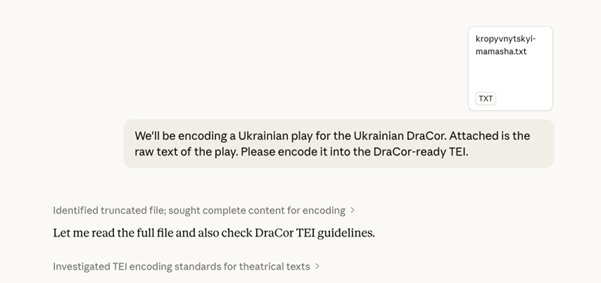
Fig. 4 Example: Prompting Claude Sonnet 4.6 [Anthropic26b] to encode a plain text of a play in DraCor-style TEI/XML.#
Given a prompt that explains the desired encoding conventions and a sample of the text, a large language model, such as Claude [Anthropic26a], GPT [OpenAI26], Gemini [GoogleDeepMind26], or Mistral [MistralAI25], can produce output that correctly identifies speakers, speech, stage directions, and structural divisions (acts, scenes).
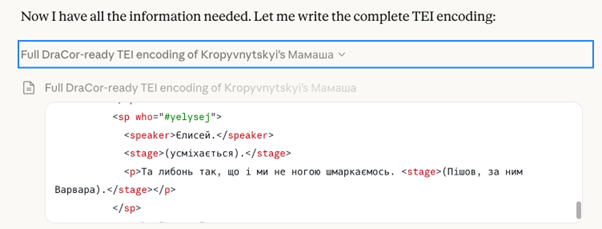
Fig. 5 Example: Claude Sonnet 4.6 [Anthropic26b] outputting DraCor-style TEI/XML of a Ukrainian play.#
Three significant challenges remain with this approach. First, there are size limitations. LLM input and especially output windows are bounded, and a full-length play (which can run to tens of thousands of words) may not fit in a single prompt-response cycle. This can be addressed by processing the play in chunks – feeding it to the model act by act or scene by scene, via the API or manually through a web interface – but this introduces the challenge of reassembling the chunks into a single coherent document. Second, and more fundamentally, the LLM is regenerating the entire text together with the markup, which means every word of the play passes through the model’s generative process. This creates the risk of hallucinations (invented text that was not in the original) and omissions (lines or passages silently omitted). Mitigating this requires systematic post-encoding control: aligning and comparing the generated encoded text against the original text to verify that nothing has been added, removed, or altered. These control procedures are essential – an encoding method that occasionally fabricates or omits dramatic dialogue is not acceptable for a scholarly corpus. Third, this approach may not work well when encoding texts in low-resource languages. Because low-resource languages remain underrepresented in LLM training and evaluation, the success of LLM-based encoding workflows in high-resource languages should not be assumed to generalise to low-resource settings (cf. [JST+25]).
4.3.6. Semi-Automatic Encoding with EzDrama#
Between the extremes of simple regular expression scripts and full TEI file generation with LLMs lies the intermediary markup tool EzDrama. In the practice of building DraCor corpora from unstructured or weakly structured sources, the DraCor community developed EzDrama as an intermediary format and encoding tool [drant]. EzDrama is a lightweight markup language designed specifically for dramatic texts. It serves as a middle layer between plain text and fully structured TEI/XML – a stepping stone that is easy for humans to write and read, and that can be converted to valid TEI automatically by a rule-based Python script [drant]. Here is an example of a mock play in three forms: raw text, EzDrama markup, and the TEI/XML that is generated automatically with EzDrama.
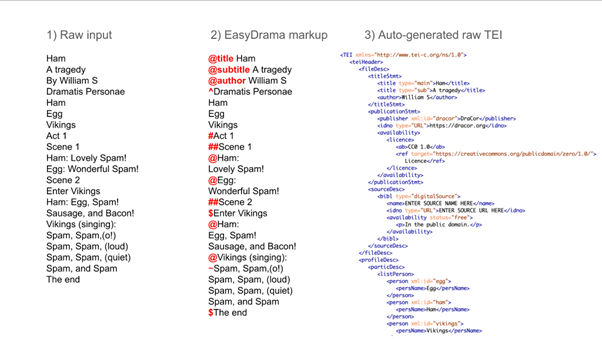
Fig. 6 A model ‘mock play’ in three forms: plain text, plain text with EzDrama, and the auto-generated TEI/XML (the latter cropped at the bottom).#
The core advantage of EzDrama is that its syntax is simpler and more compact than TEI/XML. Where TEI/XML requires opening and closing tags, namespace declarations, nested element hierarchies, and careful attention to well-formedness, EzDrama uses a handful of single-character markers (“#”, “@”, “$”, “%”, “~”) at the beginning of the respective line. The format is reminiscent of Markdown or YAML – familiar to anyone who has written a README file in a GitHub repository. Because the markup is flat (line-based rather than hierarchically nested), it is robust against the kinds of errors that plague manual XML editing: a missing closing tag, a mismatched element name, or an unescaped ampersand.
The syntax of EzDrama is designed to distinguish the core structural elements of a dramatic text as encoded in DraCor TEI: the division of a drama into acts and scenes, the separation of stage directions from dialogue, and the identification of speakers. The complete set of markers is very small, as you may see below.
# at the beginning of a line marks a first-level division (typically an act). ## marks a second-level division (typically a scene). ### marks a third level, and so on – the number of nesting levels is not limited.
@ at the beginning of a line marks a speaker line – the appearance of a character name that introduces a speech. On conversion, this creates an <sp> element with a <speaker> element inside it. All subsequent unmarked lines (lines without any special symbol at the start) are treated as the speech of that character and are placed inside the same <sp> element, until the next @ or another marker is encountered.
$ at the beginning of a line marks a stage direction. The $ also captures all following unmarked lines (until the next marker) as part of the same stage direction. Additionally, text enclosed in parentheses, (), anywhere in the text is automatically converted to inline stage directions – a convenient shorthand since many source texts already use parentheses for this purpose.
% marks a single-line inline stage direction within a speech – for cases where a brief direction (like “singing” or “aside” or “giving a chair”) needs to appear at the start of a text spoken by a character rather than as a separate block. Needs to be followed by a linebreak in the current implementation of EzDrama, to separate from the speech text.
~ toggles between prose and verse mode within a speech. If the default mode of the drama is prose (the most common case for modern plays), lines after a ~ marker will be encoded as verse lines (<l> elements) instead of paragraphs (<p> elements); a second ~ switches back to the default.
^ marks lines as belonging to the cast list (<castList> element), encoding them as <castItem> elements.
For metadata, @title, @author, and @subtitle at the beginning of a line encode the corresponding information for the <teiHeader> element.
That is, essentially, the entire syntax. A handful of single-character markers, applied at the beginnings of lines, capture the structural distinctions that matter for a DraCor TEI document. To see how these markers work in practice, consider the opening of Shakespeare’s “Hamlet” [Sha]. In raw plain text, the beginning of the play might look like this:
ACT 1
Scene 1
Enter Barnardo and Francisco, two sentinels.
BARNARDO
Who's there?
FRANCISCO
Nay, answer me. Stand and unfold yourself.
To prepare this passage for conversion, one adds EzDrama markers – six characters in total:
#ACT 1
##Scene 1
$Enter Barnardo and Francisco, two sentinels.
@BARNARDO
Who's there?
@FRANCISCO
Nay, answer me. Stand and unfold yourself.
The EzDrama parser [drant] then converts this automatically into the following TEI/XML:
<div type="act">
  <head>ACT 1</head>
  <div type="scene">
    <head>Scene 1</head>
    <stage>Enter Barnardo and Francisco, two sentinels.</stage>
    <sp who="#barnardo">
      <speaker>BARNARDO</speaker>
      <p>Who's there?</p>
    </sp>
    <sp who="#francisco">
      <speaker>FRANCISCO</speaker>
      <p>Nay, answer me. Stand and unfold yourself.</p>
    </sp>
  </div>
</div>
The parser also automatically generates the <teiHeader> element, including a <particDesc> element that lists all characters whose speeches were marked in the EzDrama input:
<listPerson>
  <person xml:id="barnardo">
    <persName>BARNARDO</persName>
  </person>
  <person xml:id="francisco">
    <persName>FRANCISCO</persName>
  </person>
</listPerson>
The speaker identifiers (barnardo, francisco) are generated automatically from the speaker line in the text: lowercased, with punctuation stripped. The @who attribute on each <sp> element is constructed as a #-prefixed reference to the corresponding @xml:id, exactly as the encoding conventions of DraCor require.
Regarding the limitations of EzDrama, the conversion is purely rule-based, and like any automated procedure, the resulting XML will need adjustments before it is ready for DraCor. The most common issue is speaker name variation. If a character is referred to as “BARNARDO” in some scenes and “BERNARDO” in others (as actually happens in early editions of Hamlet), the parser will generate two separate identifiers and two separate entries in the <listPerson> element. These must be resolved to a single identifier manually, or with a simple search-and-replace action in the EzDrama file, before conversion, which is one of the advantages of working in the intermediary format rather than directly in XML. Other elements that typically require manual post-processing include metadata in the <teiHeader> element (source descriptions, dates, licence information), the @sex attribute on <person> elements, and any encoding features that go beyond basic dramatic structure (such as character relations or genre classification).
The EzDrama markup allows several ways of application, depending on the encoder’s preference and the regularity of the source text. The first way is fully manually, using any text editor. For users of Notepad++, the EzDrama repository provides a user-defined language file that enables syntax highlighting, visually distinguishing the markers from the text during editing.
The second way is with a search-and-replace action, when the source text has partial regularities that can be relied upon. For instance, if all speaker names happen to be in capital letters, a single regex replacement can prepend @ to every line that matches the pattern ^[A-Z][A-Z ]+$ – converting hundreds of speaker lines in one operation and leaving only the structural markers for text divisions and stage directions (#, $) to be added by hand.
The third way is with the help of an LLM. One of the practical advantages of EzDrama emerges in this scenario. Because EzDrama markup is flat and line-based, it is straightforward to split a long play into chunks, have each chunk processed by an LLM, and then concatenate the results. With XML, this kind of chunking is treacherous: an <sp> element that spans a chunk boundary will be broken in two, producing invalid XML that must be painstakingly repaired. With EzDrama, the chunks simply join end to end – there are no hierarchical structures to break.
5. Exercises#
Exercise 1: Encoding Strategy#
Self-test
Open the Assessment: TEI Encoding.
Exercise 2: Manual Encoding#
Self-test
Open the Assessment: TEI Encoding.
Exercise 3: Semi-Automatic Encoding with EzDrama#
Self-test
Open the Assessment: TEI Encoding.
Exercise 4: Encoding with LLMs#
Self-test
Open the Assessment: TEI Encoding.
6. Teaching Notes#
Lecturers may use this chapter to give a practice-oriented introduction to TEI/XML encoding to their students. Depending on the participants’ level of studies, it may make sense to work through this chapter step by step, including discussion phases between the subchapters.
Moreover, lecturers may consider continuing with an encoding unit after this introduction, letting their students encode a drama, and, thus, fostering student research [Bei26a]. In that case, lecturers may only discuss the encoding scenarios from this chapter relevant to the text(s) they selected for the subsequent encoding unit.
Another teaching scenario after the present introduction could look as follows. The lecturer divides the class into smaller groups. Each group encodes the same text (passage) but is assigned another encoding method by the lecturer. After the parallel encoding sessions, each group presents its results as well as the advantages and disadvantages of the encoding method used. Subsequently, the whole class compares the overall results and reflects upon the strengths and weaknesses of the encoding methods. Note that the lecturer should consider the level of knowledge and programming skills of the students before building the groups and assigning encoding methods.
7. Further Reading and Resources#
To further engage with XML, you may work through specific tutorials [w3s, Haw19]. If you would like to engage with TEI more intensively, you may consult more detailed introductions and tutorials [tei, tei26a, TVVandBranden20].
8. Glossary Entries#
Term |
Definition [2] |
|---|---|
(to) encode / Encoding |
In the context of TEI/XML, the verb “encode” refers to the process of adding information to an electronic text, e.g. in the form of XML tags. The noun “encoding” refers to the result of this procedure, e.g. the XML markup in a file. |
HTML |
An abbreviation for the “Hypertext Markup Language” commonly used on websites. |
LLM |
An abbreviation for “Large Language Model”, a type of artificial intelligence that generates text. Large Language Models may serve as the basis of Chatbots. |
(to) mark up / markup |
In the context of TEI/XML, the noun “markup” refers to the information added to an electronic text in the form of XML tags. The verb “mark up” refers to the process of adding this information to the text. |
OCR |
An abbreviation for “Optical Character Recognition” that refers to the process of generating machine-readable text from an image of said text, e.g. from a scan. |
(to) prompt / prompt |
In the context of Artificial Intelligence, the verb “prompt” refers to instructing a Large Language Model in a way that requests a certain form of output by the Large Language Model. The noun “prompt” refers to the instruction. |
Python |
Python is a programming language. |
R |
R is a programming language. |
Regular expression |
Regular expressions consist of one or more characters or symbols through which a text may be searched for certain patterns. In find-and-replace actions or programming scripts, regular expressions may serve as placeholders to address these patterns to encode them in a certain way in TEI/XML. |
string |
A string is any sequence of digital characters. |
TEI |
An abbreviation for “Text Encoding Initiative” which may refer to that organisation, its encoding guidelines, or files that follow those guidelines. |
XML |
An abbreviation for “eXtensible Markup Language”, a method for marking up texts and encoding information. |
XQuery |
An abbreviation for “XML Query Language”, a programming language. |
XSLT |
An abbreviation for “EXtensible Stylesheet Language Transformations”, a programming language. |
YAML |
An abbreviation for “YAML Ain’t Markup Language”, a data serialisation language for all programming languages. |
9. Next Steps#
Continue with Chapter 5, “API: Working with DraCor Programmatically” on the DraCor API to learn more about TEI processing, or continue with Chapter 4, “Front-End: Navigating DraCor” on the DraCor front-end to engage with the outputs of such TEI processing.
10. AI Use Declaration#
In chapter 4.3.3., 4.3.4., 4.3.5., and 4.3.6., Daniil Skorinkin used Claude Opus 4.6 in the process of writing and editing – text generation, writing and editing – summarising text, and writing and editing – formulation of conclusions. In the other chapters, no generative AI was used.
12. References#
Oxygen XML Editor. SyncRO Soft SRL. URL: https://www.oxygenxml.com/ (visited on 2026-02-17).
Teach Yourself TEI. URL: https://tei-c.org/support/learn/teach-yourself-tei/ (visited on 2026-04-12).
Dracor.org Platform. URL: https://dracor.org/ (visited on 2026-04-12).
XML Tutorial. URL: https://www.w3schools.com/xml/default.asp (visited on 2026-02-17).
Easy Drama (EzDrama). 2022–present. URL: dracor-org/ezdrama (visited on 2026-04-12).
A Gentle Introduction to XMLP5 [P5 Version 4.11.0. Revision 358d2e48e]. February 2026. URL: https://tei-c.org/release/doc/tei-p5-doc/en/html/SG.html (visited on 2026-04-12).
About These Guidelines [P5 Version 4.11.0, revision 358d2e48e]. February 2026. URL: https://tei-c.org/release/doc/tei-p5-doc/en/html/AB.html (visited on 2026-04-12).
DraCor API. February 2026. URL: dracor-org/dracor-api (visited on 2026-04-12).
DraCor API [Documentation]. 2026. URL: https://dracor.org/doc/api# (visited on 2026-04-12).
DraCor Oxygen Framework. April 2026. URL: dracor-org/dracor-oxygen-framework (visited on 2026-04-12).
DraCor Schema. February 2026. URL: dracor-org/dracor-schema (visited on 2026-04-12).
TEI Guidelines for Electronic Text Encoding and Interchange: Index [P5 Version 4.11.0, revision 358d2e48e]. February 2026. URL: https://tei-c.org/release/doc/tei-p5-doc/en/html/index.html (visited on 2026-04-12).
Julia Jennifer Beine. Einführung: digitale methoden in der (klassischen) philologie und literaturwissenschaft. forTEXT. Textannotation in der Hochschullehre, 2026. doi:10.48694/fortext.4803.
Julia Jennifer Beine. Einführung: digitale methoden in der (klassischen) philologie und literaturwissenschaft [moodlekurs]. 2026. doi:10.5281/zenodo.20118654.
Julia Jennifer Beine, Ingo Börner, Frank Fischer, Luca Giovannini, Carsten Milling, Daniil Skorinkin, and Peer Trilcke. DraCor ODD. 2026. URL: dracor-org/dracor-schema (visited on 2026-04-12).
Julia Jennifer Beine and Daniil Skorinkin. From dramatic text to dracor tei: xml/tei introduction, encoding drama in tei, and automation of encoding. September 2025. doi:10.5281/ZENODO.16994544.
Lou Burnard. A Productivity Boost. March 2026. doi:10.58079/15ysy.
Lou Burnard. Lacy Drama Corpus (LacyDraCor). 2026. URL: dracor-org/lacydracor (visited on 2026-04-12).
Frank Fischer, Ingo Börner, Mathias Göbel, Angelika Hechtl, Christopher Kittel, Carsten Milling, and Peer Trilcke. Programmable Corpora: Introducing DraCor, an Infrastructure for the Research on European Drama. In DH 2019 Book of Abstracts. Utrecht University, Utrecht, 2019. Zenodo. URL: https://zenodo.org/record/4284002 (visited on 2026-02-17), doi:10.5281/ZENODO.4284002.
Luca Giovannini and DraCor team. English Drama Corpus (EngDraCor). 2024–present. URL: dracor-org/engdracor (visited on 2026-04-12).
Johann Wolfgang Goethe. Faust. URL: https://dracor.org/id/ger000243 (visited on 2026-04-12).
Kevin S. Hawkins. Introduction to XML for Text. October 2019. URL: http://www.ultraslavonic.info/intro-to-xml/ (visited on 2026-02-17).
Suramya Jadhav, Abhay Shanbhag, Amogh Thakurdesai, Ridhima Sinare, and Raviraj Joshi. On Limitations of LLM as Annotator for Low Resource Languages. In Mourad Abbas, Tariq Yousef, and Lukas Galke, editors, Proceedings of the 8th International Conference on Natural Language and Speech Processing (ICNLSP-2025), 277–282. Southern Denmark University, Odense, August 2025. Association for Computational Linguistics. URL: https://aclanthology.org/2025.icnlsp-1.27/ (visited on 2026-04-19).
Georgius Macropedius. Hecastus. Converted to TEI under the supervision of Julia Jennifer Beine. Converted to TEI by Leon Fabian Gleser, Steffen Gutbier, Joshua Mährmann, Paula van Bonn, Rabea Klara Sülz, Carina Christensen, Kassandra Marie Stangel, and Christina Charalampidou. URL: https://staging.dracor.org/id/neolat000001 (visited on 2026-05-20).
Carsten Milling, Frank Fischer, and Mathias Göbel. French Drama Corpus (FreDraCor): A TEI P5 Version of Paul Fièvre's "Théâtre Classique" Corpus. 2021–present. URL: dracor-org/fredracor (visited on 2026-04-12).
Steven Pemberton. Invisible XML Specification. September 2022. URL: https://invisiblexml.org/1.0/ (visited on 2026-04-12).
William Shakespeare. Hamlet. URL: https://dracor.org/id/shake000032 (visited on 2026-04-12).
Willian Shakespeare. Macbeth. 2021–present. URL: https://dracor.org/id/gersh000028 (visited on 2026-04-12).
Melissa Terras, Edward Vanhoutte, and Ron Van den Branden. TEI by Example. 2020. URL: https://teibyexample.org (visited on 2026-02-17).
Raff Viglianti, Peter Stadler, and Bryan Wang. Roma - ODD Customization. February 2026. URL: https://roma.tei-c.org/ (visited on 2026-04-12).
Georg Vogeler and Patrick Sahle. XML. In Fotis Jannidis, Hubertus Kohle, and Malte Rehbein, editors, Digital Humanities: Einführung, pages 128–146. J.B. Metzler, Stuttgart, 2017. URL: http://link.springer.com/10.1007/978-3-476-05446-3 (visited on 2026-02-17), doi:10.1007/978-3-476-05446-3.
Anthropic. Introducing Claude Opus 4.6 [Large Language Model]. February 2026. URL: https://www.anthropic.com/news/claude-opus-4-6 (visited on 2026-04-19).
Anthropic. Introducing Claude Sonnet 4.6 [Large Language Model]. February 2026. URL: https://www.anthropic.com/news/claude-sonnet-4-6 (visited on 2026-04-19).
Google DeepMind. Gemini 3.1 Pro: A Smarter Model for Your Most Complex Tasks [Large Language Model]. February 2026. URL: https://blog.google/innovation-and-ai/models-and-research/gemini-models/gemini-3-1-pro/ (visited on 2026-04-19).
Mistral AI. Introducing Mistral 3 [Large Language Model]. December 2025. URL: https://mistral.ai/news/mistral-3 (visited on 2026-04-19).
Molière. Le Misanthrope. URL: https://dracor.org/id/fre001019 (visited on 2026-04-12).
OpenAI. GPT-5.3 Instant: Smoother, More Useful Everyday Conversations [Large Language Model]. March 2026. URL: https://openai.com/index/gpt-5-3-instant/ (visited on 2026-04-19).
Oxford English Dictionary. Mark-up, n., sense 2.c. December 2023. URL: https://doi.org/10.1093/OED/1115679047.
Oxford English Dictionary. Encode, v. September 2025. URL: https://doi.org/10.1093/OED/7215232060.
Oxford English Dictionary. Prompt, n.², sense 2.d. December 2025. URL: https://doi.org/10.1093/OED/1206861281.
Oxford English Dictionary. Regular expression, n. June 2025. URL: https://doi.org/10.1093/OED/3705754966.
Syncro Soft SRL. Regular Expressions Syntax. 2026. URL: https://www.oxygenxml.com/doc/versions/28.1/ug-editor/topics/regular-expressions.html (visited on 2026-04-12).