
API: Working with DraCor Programmatically#
Chapter metadata
Authors: Ingo Börner
Version: 0.2 (2026-09-14)
Review status: Revised
Reviewer: Antonio Rojas Castro
Note
How to use this chapter: We begin with the interactive API documentation in the browser, then progressively move towards programmatic access using Python. Each section introduces general API concepts through concrete DraCor examples. If you are not (yet) comfortable with programming, the first sections work entirely in the browser.
1. Overview#
In the previous chapter we explored DraCor through its web front-end — browsing corpora, inspecting plays tab by tab and downloading files. Everything we saw there is powered by the DraCor API (Application Programming Interface). The API is the programmatic backbone of DraCor: the front-end sends requests to the API and displays the results. When we clicked on a GEXF download in the Downloads tab, we were — without knowing it — calling the API endpoint https://dracor.org/api/v1/corpora/ger/plays/lessing-emilia-galotti/networkdata/gexf.
The API is also at the core of the “Programmable Corpora” concept that motivates DraCor (see Chapter 1). Programmable Corpora are “corpora that expose an open, transparently documented and (at least partly) research-driven API to make texts machine-actionable” [BornerT23]. The API does not merely provide access to data; it stabilises how specific layers of a text (such as spoken text or stage directions) are extracted, and it standardises workflows (such as generating co-occurrence networks) so that different researchers work with comparable results [BornerT23].
In this chapter we learn what an API is, how the DraCor API is structured and how to use it — first through the interactive documentation in the browser, then programmatically with Python. Along the way, we introduce general API concepts (requests, parameters, responses and status codes) through concrete DraCor examples. By the end of the chapter, we will be able to retrieve and analyse data from DraCor at a scale that the front-end alone cannot support, using the Python API wrapper for DraCor, PyDraCor.
2. Requirements and Competences#
Web browser and internet access.
Familiarity with the DraCor front-end (Chapter 4) is helpful but not strictly required.
No programming experience is needed for the first sections (Examples 1–4), which work entirely in the browser.
For the later sections (Examples 5–6), basic willingness to try Python is sufficient. We explain every step.
3. Learning Outcomes#
After completing this chapter, learners will be able to:
Explain what a REST API is and why DraCor provides one.
Use the Swagger UI to explore and test the DraCor API documentation.
Navigate the DraCor API using the identifier flow (corpora → corpus → play).
Read an API response in JSON and interpret HTTP status codes.
Make API requests using the browser, the terminal with
curl, and Python (requests).Use PyDraCor to simplify programmatic access to DraCor data.
Retrieve and analyse corpus-level data using the API (e.g. metadata as a Pandas DataFrame).
4. Theoretical Background#
4.1. What Is an API?#
An API (Application Programming Interface) is a structured way for one piece of software to request data or services from another. Rather than navigating a website manually — clicking links, reading pages — an API allows us to send a precisely formatted request to a server and receive a precisely formatted response. The server exposes specific endpoints (URLs), each of which provides access to a particular resource or function.
A common analogy used to explain APIs is the library desk: we do not walk into the stacks ourselves, but instead give the librarian a call number — the endpoint and its identifiers — and they bring us the material in the format we need. We do not need to know how the stacks are organised or where exactly the book is stored; we only need to know how to formulate our request. In the DraCor context, this maps quite naturally: the corpus name is like the section of the library, the play name is the call number, and the format we request (JSON, CSV, TEI, plain text) is like asking for the original, a photocopy, or a summary.
Another way to think about the DraCor API is as a translator: the data in DraCor is stored as TEI/XML in an eXist-db database and processed with XQuery — formats and technologies that most researchers do not work with directly. The API translates between what the database knows and what we need. We speak our language (Python, R or simply a browser) — in technical terms, our software acts as a client that sends requests — and the API, running on the server, speaks the language of the database, returning the results in a format we can work with. In this sense, the API is not just an access point but an intermediary that bridges the gap between the technical infrastructure and the researcher’s workflow. Anything that sends requests to the API is a client: a Python script, a browser or even the DraCor front-end itself.
Most modern web APIs, including the DraCor API, follow the REST (Representational State Transfer) architectural style, introduced by Roy Fielding in 2000 [Fie00]. REST is not a protocol but a set of design principles (for a practical guide see [Masse11]): APIs are organised around resources (things with URLs, such as a corpus or a play), interactions are stateless (each request is self-contained — the server does not track or remember what we requested before) and standard HTTP methods are used — these are verbs that tell the server what action we want to perform, much like commands in a conversation: GET means “give me this data”, POST means “create something new”, PUT means “update this” and DELETE means “remove this”. In practice, when working with the DraCor API as researchers, we almost exclusively use GET. Together, these principles — resources with stable URLs, stateless interactions and standard HTTP methods — form the conventions of RESTful API design. They make APIs predictable: once we understand the pattern, we can often guess how an unfamiliar endpoint works, even without reading its documentation first.
The DraCor API follows what we might call “pragmatic REST”. It adheres to the core principles that Fielding laid out — resource-oriented design, stateless interactions, standard HTTP methods — but it occasionally departs from REST conventions where practicality demands it. For example, it places format information in the URL path (e.g. /networkdata/csv versus /networkdata/gexf) rather than relying solely on HTTP content negotiation — the mechanism by which a client and server agree on the format of the data to be exchanged. In a “pure” REST API, we would request the same URL and specify the desired format in a header (like saying “I would like this in CSV, please”), but in DraCor, the format is simply part of the URL itself, which makes it easier to share and bookmark specific formats. To return to our library analogy: in a “pure” REST scenario, we would hand the librarian a call number and attach a separate note saying “photocopy, please”; in DraCor, the call number itself already says “photocopy” — the format is written on the slip from the start. This makes endpoints more discoverable — the URL itself tells us what we are getting — even if a REST purist might prefer a different approach (cf. [Masse11]).
4.2. Why an API for Literary Corpora?#
Working with the front-end, we can explore one play at a time: select a corpus, click on a play, inspect tabs. This is valuable for close exploration, but it does not scale. If we want to compare the ratio of stage directions to spoken text across all 600+ plays in GerDraCor, the front-end offers no way to do so.
Without an API, the alternative would be to download the TEI/XML source files from GitHub and write our own scripts to parse them — extracting spoken text, stage directions, or character lists by navigating the XML structure. This requires detailed knowledge of the TEI encoding conventions used in DraCor (see Chapter 3).
The API changes this by offering pre-built extraction and analysis as endpoints. As argued in the CLS INFRA report “On Programmable Corpora” [BornerT23], APIs for literary corpora serve several functions:
Stabilising epistemic objects. API endpoints provide stable, addressable references to specific layers of a text. If we are researching the stage directions in Lessing’s Emilia Galotti, our research object is addressable at a URL:
https://dracor.org/api/v1/corpora/ger/plays/lessing-emilia-galotti/stage-directions.Standardising workflows. Operations such as extracting co-occurrence networks are implemented once in the API. Different researchers using the same endpoint work with the same extraction logic, making results comparable.
Lowering technical barriers. We can obtain network metrics as a CSV file — openable in Excel — without writing a single line of code, simply by calling the appropriate endpoint.
Bootstrapping research. Instead of starting from raw XML, we start from pre-processed, structured data. The API lets us decide at which level our research process begins [FBornerGobel+19].
4.3. The Front-end as an API Client#
It is worth emphasising that the DraCor front-end is itself a client of the API. The React-based web application (see the front-end repository on GitHub; for a deeper look at the technical architecture of DraCor, see Chapter 6) sends requests to the same endpoints that we will use in this chapter. The Downloads tab on a play page, for example, provides links that resolve to API endpoints: clicking “GEXF” triggers a request to /api/v1/corpora/{corpusname}/plays/{playname}/networkdata/gexf. Understanding the API therefore also means understanding what the front-end does behind the scenes. For a detailed mapping of which API endpoints are used by which front-end page and tab, see the overview table in [BornerT23] (p. 55).
Tip for learners
If you have the DraCor front-end open alongside this chapter, you can compare what you see in the browser with what the API returns. The front-end URL https://dracor.org/ger/lessing-emilia-galotti contains the same identifiers (ger and lessing-emilia-galotti) that we use in API requests.
5. Practical Examples: The DraCor API#
5.1. Exploring the API Documentation (Swagger UI)#
Before we make our first request, we need to know what the API offers. The DraCor API is documented using the OpenAPI Specification — a standardised, machine-readable format for describing API endpoints, their parameters, and their responses [BornerTSG25]. This specification is rendered as an interactive website using Swagger UI, accessible at https://dracor.org/doc/api.[1]
Important distinction
The Swagger UI is the documentation about the API — it is not the API itself. The API lives at https://dracor.org/api/v1/. The documentation describes what the API can do and lets us try it out.
Think of the OpenAPI specification as a contract: the developers of DraCor declare “we offer these endpoints, and if you use them the right way, you will get back data in this form.” This contract is both human-readable (through the Swagger UI) and machine-readable (the underlying YAML file), which is why tools like PyDraCor can be generated automatically from it.
When we open the Swagger UI, we see the API endpoints grouped by tags: public, admin, DTS, Wikidata, and webhook. For this chapter, we focus on the public endpoints — these are the ones that return data without requiring authentication. The admin endpoints are used for managing corpora on a local DraCor instance and require authentication; we will not need them here. The DTS and Wikidata endpoints are also publicly accessible but serve more specialised purposes that go beyond this introduction.[2]
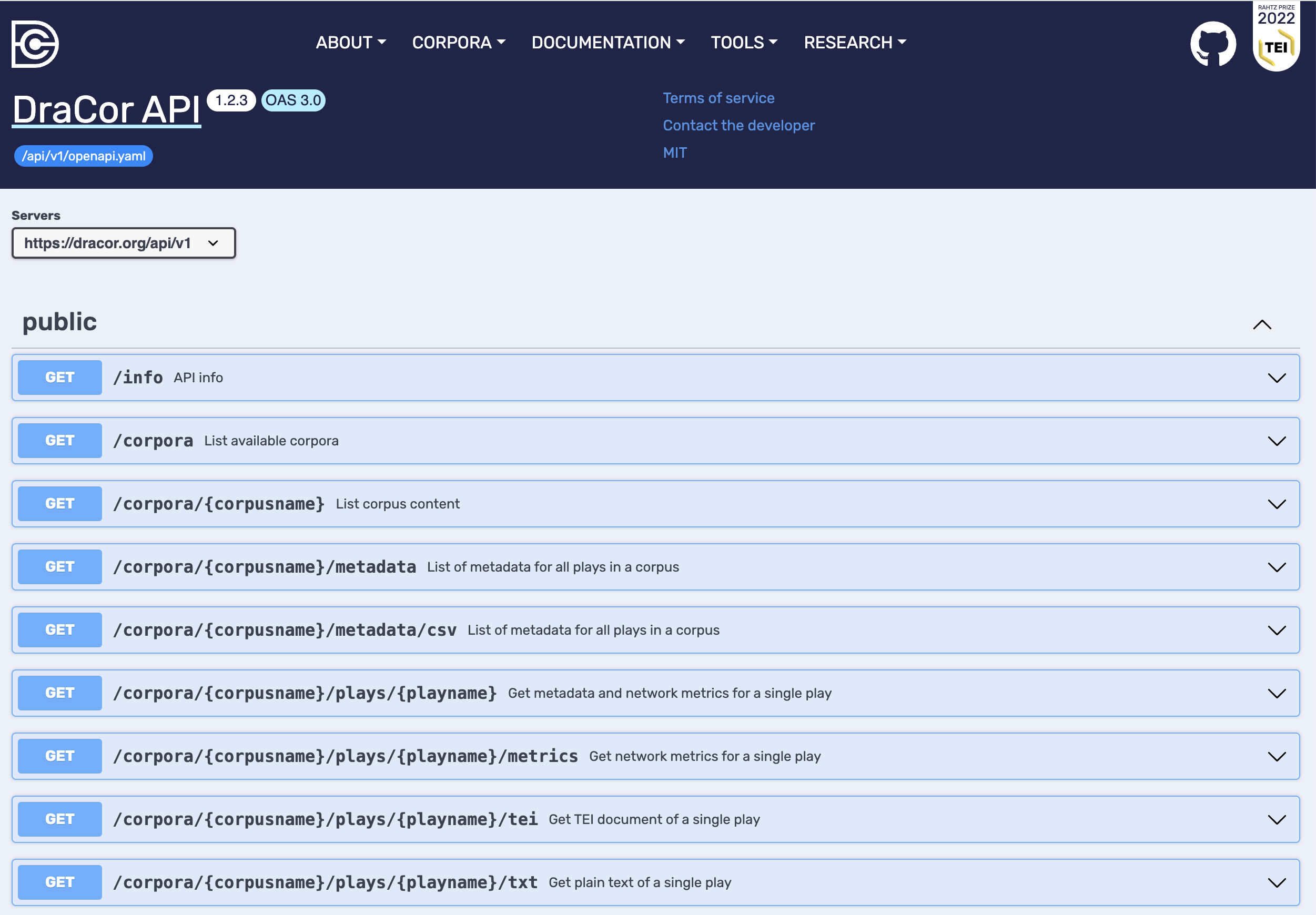
Fig. 14 The DraCor API documentation in Swagger UI at dracor.org/doc/api. The public endpoints are listed with their HTTP method (GET), path and a short description.#
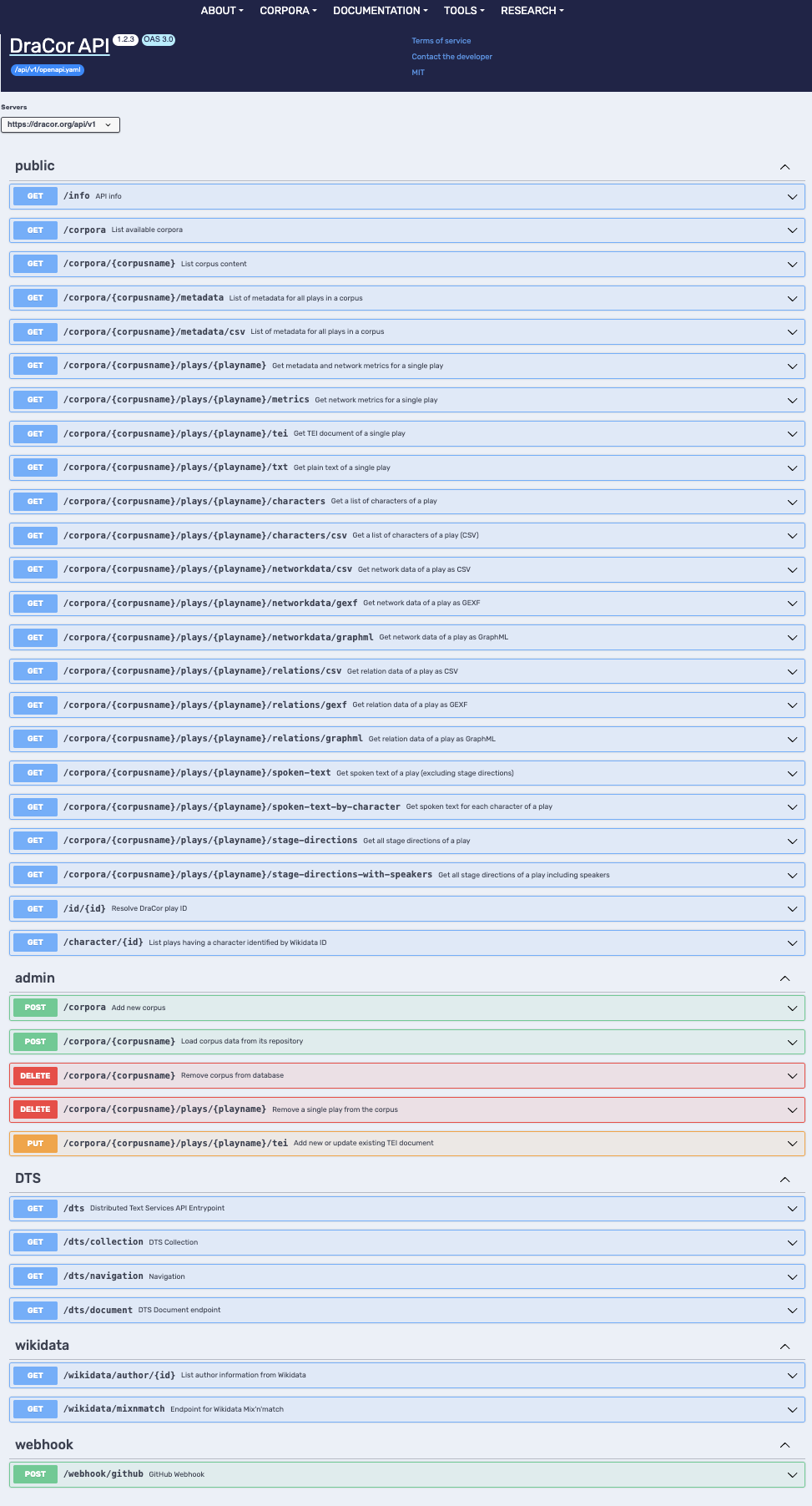
Fig. 15 Overview of all endpoint groups in the Swagger UI. The public endpoints at the top are the focus of this chapter; the admin, DTS, Wikidata and webhook groups serve more specialised purposes.#
What the DraCor API can do
The public endpoints of the DraCor API support four main capabilities:
Explore corpora and plays — browse corpora, list plays, get metadata.
Retrieve text — TEI/XML source, plain text, and specific text layers (spoken text, stage directions), with options to filter, e.g. by character or gender.
Extract structured data — characters, social relations, co-occurrence networks, and network metrics.
Self-documentation — version information about the API and its underlying components.
In the following examples, we explore these capabilities step by step, starting with the simplest request and building up to corpus-level analysis.
5.2. The First Request: Listing Corpora#
Let us make our first API request. We want to find out which drama corpora are available in DraCor. In the Swagger UI, the first public endpoint listed is /info, which returns information about the API version and the underlying infrastructure. This is useful for documentation purposes, but the more interesting starting point is the second endpoint: /corpora, described as “List available corpora.”
In the Swagger UI, each endpoint is displayed as a collapsible box. To the left of the endpoint path, we see a coloured badge showing the HTTP method — in this case GET. GET is the HTTP method for retrieving data, and it is the method we use for virtually all public DraCor API requests. Importantly, GET requests do not change anything on the server: we can experiment freely without risk.
When we click on the /corpora box to expand it, we see several sections:
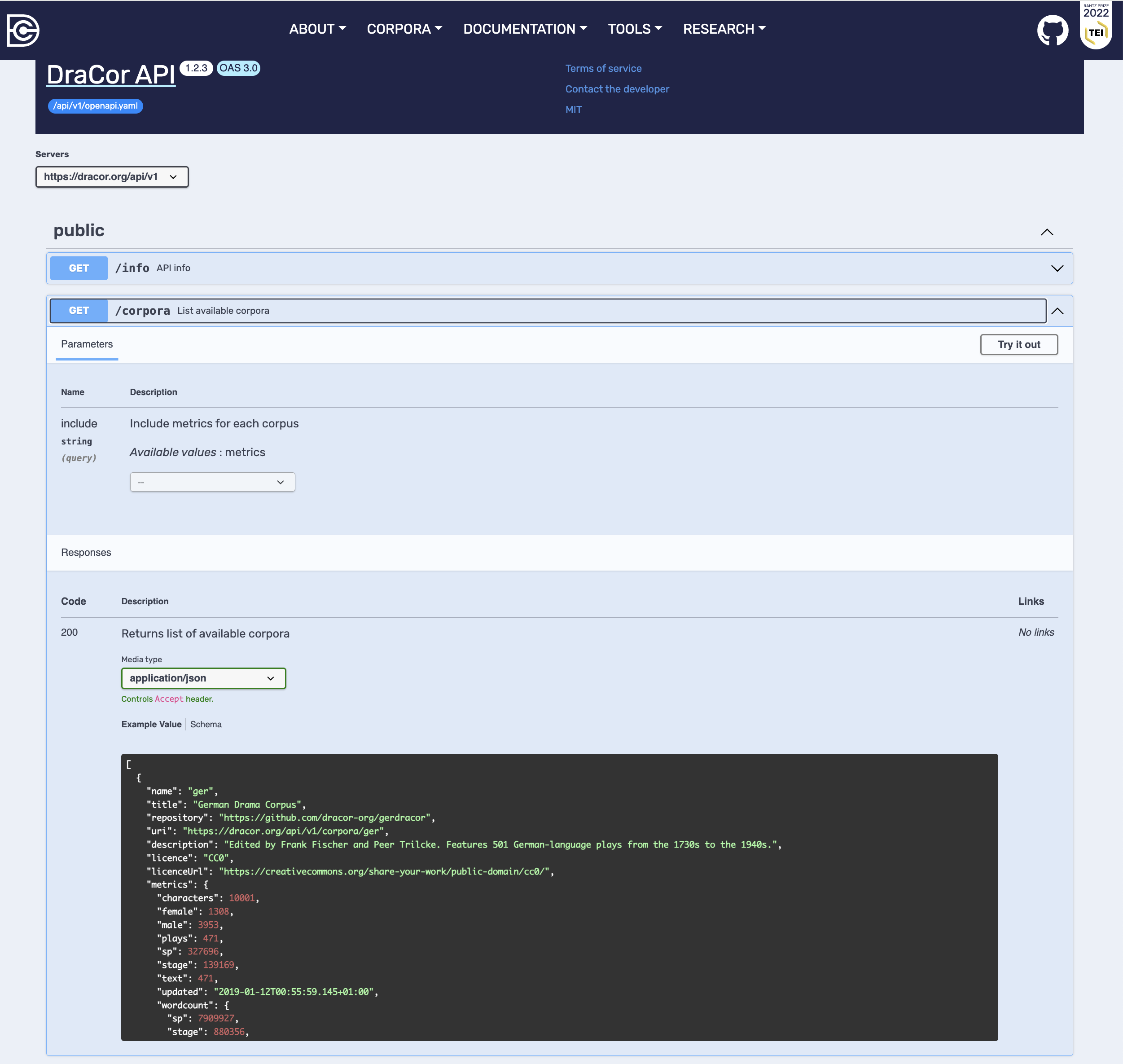
Fig. 16 The /corpora endpoint expanded in Swagger UI. We can see the query parameter include, the expected response (status code 200, media type application/json) and an example value showing a corpus object.#
Parameters. The
/corporaendpoint accepts one optional query parameter calledinclude. If we set it tometrics, the response will contain additional statistical information about each corpus (number of plays, characters, word counts). Query parameters are appended to the URL after a?— for example:https://dracor.org/api/v1/corpora?include=metrics.Responses. This section shows the possible HTTP status codes. If everything goes well, we receive a 200 OK response. The response format (or media type) is
application/json— meaning the data comes back as JSON (JavaScript Object Notation), the standard data format for web APIs.Example value. Before even executing a request, we can see what a typical response looks like. In this case, it is a JSON array — a list of objects, each representing one corpus. Each corpus object contains fields like
name(the short identifier, e.g."ger"),title(e.g."German Drama Corpus"), and a link to the GitHub repository.Schema. Clicking on the “Schema” tab shows a more formal description of the response structure, including which fields are mandatory (marked with a red asterisk).
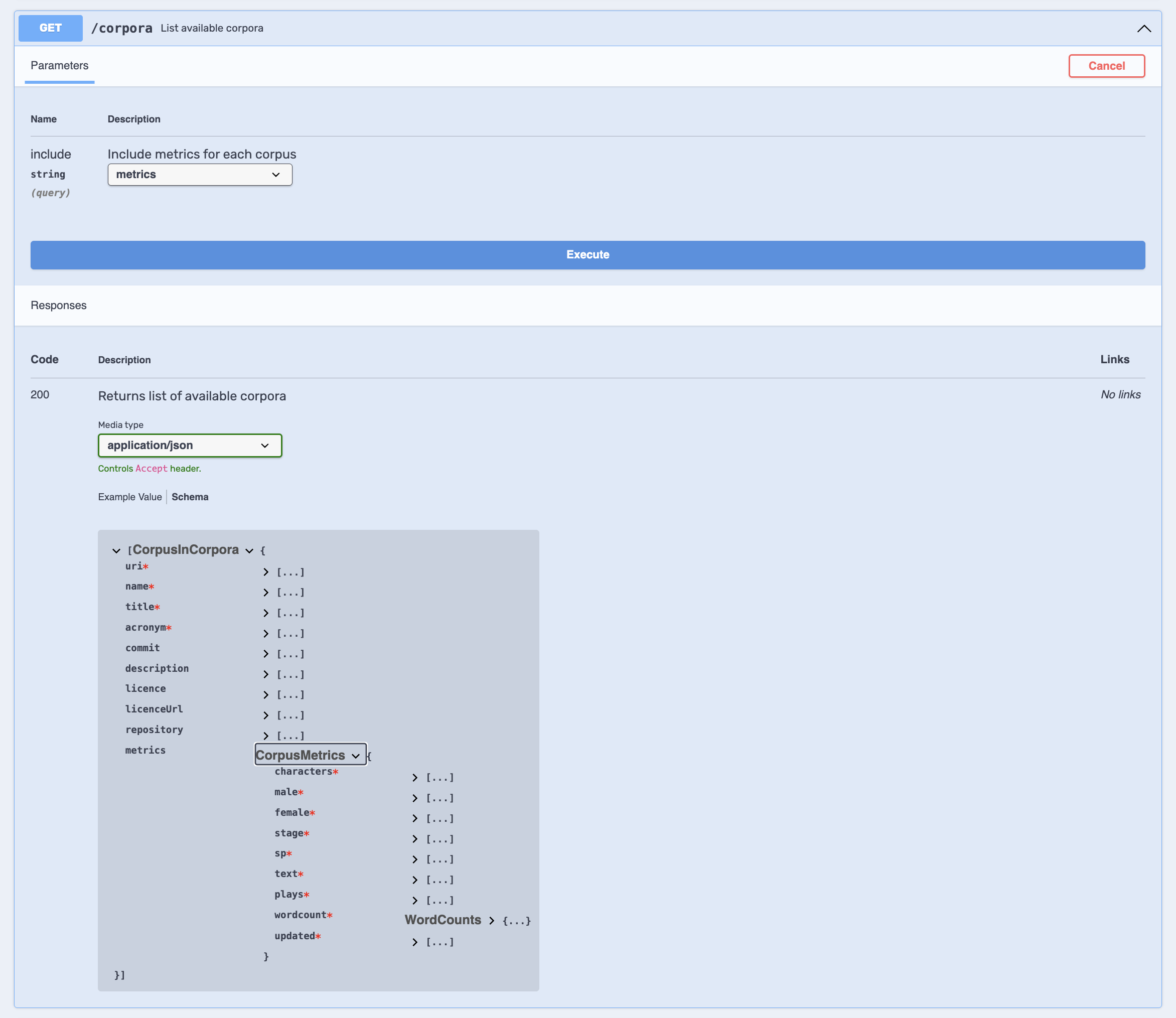
Fig. 17 The /corpora endpoint after clicking “Try it out” and selecting the Schema view. The response schema shows the CorpusInCorpora object with its fields (name, title, description, etc.) and the nested CorpusMetrics object (when include=metrics is set).#
To actually execute the request, we click “Try it out”, optionally set the include parameter to metrics, and click “Execute”. The Swagger UI then shows us three things:
The
curlcommand — a command-line instruction that performs the same request.The request URL — the full URL that was called (e.g.
https://dracor.org/api/v1/corpora?include=metrics).The server response — the actual JSON data returned by the API, along with response headers.
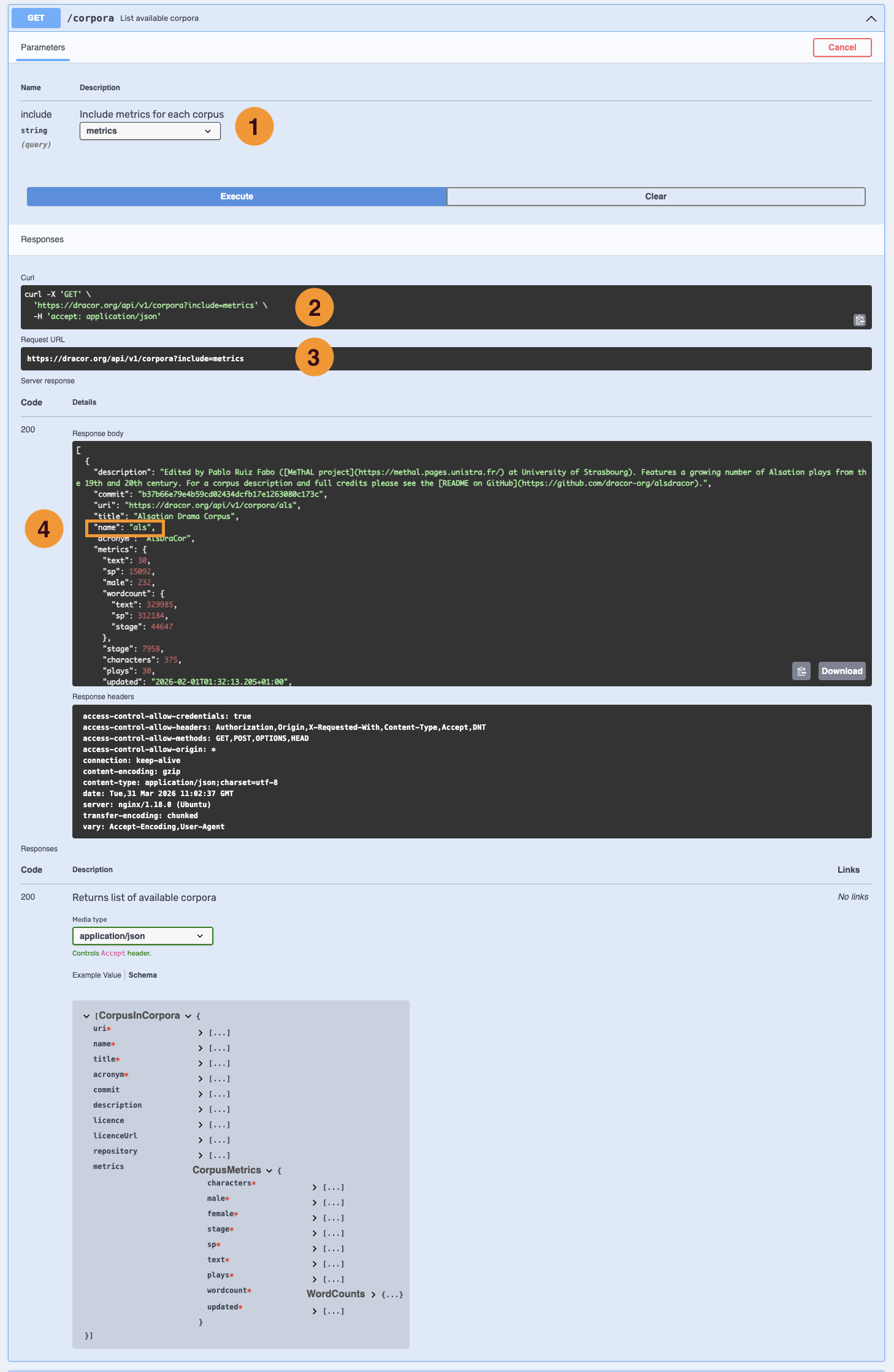
Fig. 18 The /corpora endpoint after execution. (1) The query parameter include is set to metrics. (2) The generated curl command. (3) The request URL. (4) The server response body — note the highlighted name field, which provides the corpus identifier (corpusname) needed for subsequent requests.#
What is JSON?
JSON (JavaScript Object Notation) is a lightweight data format that uses two basic structures: objects (collections of key-value pairs, enclosed in { }) and arrays (ordered lists, enclosed in [ ]). For example, {"name": "ger", "title": "German Drama Corpus"} is an object with two fields. An array of such objects looks like [{"name": "ger", ...}, {"name": "rus", ...}]. JSON is human-readable and supported by every programming language.
The name field in each corpus object is the identifier — the “corpusname” — that we need for all further API calls. For example, the German Drama Corpus has the corpusname "ger", the Russian Drama Corpus has "rus". We will use these identifiers in the next section.
Four Ways to Make the Same Request#
The Swagger UI is the most accessible way to explore the API, but it is not the only way. After executing a request, the Swagger UI shows us the request URL. We can use this URL in several ways, each progressively closer to programmatic research:
1. Swagger UI — click-based, visual, no code needed.
2. Browser address bar — copy the request URL (e.g. https://dracor.org/api/v1/corpora) and paste it into the browser. We see the raw JSON response directly.
3. curl in a terminal — the Swagger UI generates a curl command that we can run in a terminal:
curl -X 'GET' \
  'https://dracor.org/api/v1/corpora?include=metrics' \
  -H 'accept: application/json'
With curl, we can also inspect the response headers — metadata about the response, such as the content type and server information. Just as a TEI document has a header (metadata about the text) and a body (the text itself), an HTTP response has headers (metadata about the transmission) and a body (the actual data). To see the headers alongside the response, we can use curl with the -v (verbose) flag:
curl -v 'https://dracor.org/api/v1/corpora'
The Swagger UI also displays response headers in a separate box after executing a request.
4. Python with requests — the bridge to programmatic research:
import requests

response = requests.get("https://dracor.org/api/v1/corpora", params={"include": "metrics"})
corpora = response.json()

for corpus in corpora:
    print(f"{corpus['name']}: {corpus['title']}")
Let us walk through this code line by line:
import requests— we import therequestslibrary, a widely used Python package for making HTTP requests. It is not part of the standard library of Python, so it may need to be installed first withpip install requests.requests.get(...)— this sends a GET request to the URL we provide, just like the Swagger UI orcurldoes. Theparams={"include": "metrics"}part adds the query parameter?include=metricsto the URL. The result is stored in the variableresponse.response.json()— this parses the JSON data from the response body and converts it into Python data structures. JSON objects become Python dictionaries (key-value pairs accessed withdict['key']) and JSON arrays become Python lists. So the array of corpus objects returned by the API becomes a list of dictionaries, which we store in the variablecorpora.for corpus in corpora:— this loop iterates over each item in the list. In each iteration,corpusis a dictionary representing one corpus.print(f"{corpus['name']}: {corpus['title']}")— for each corpus, we access the values of the fieldsname(the corpusname identifier) andtitle(the full name) and print them.
If this is your first encounter with Python: congratulations, you have just read your first program. It does exactly what we did before in the Swagger UI and the browser — sends a request to the API and displays the result — but now in a form that can be extended, repeated, and automated. We will build on this pattern in the later sections of this chapter.
5.3. From Corpus to Play: The Identifier Flow#
Now that we have a list of corpora, we want to look at a specific corpus and find a play. The DraCor API is organised around two core entities — corpora and plays — and navigating between them requires understanding how identifiers flow from one request to the next.
Step 1: Getting a Single Corpus#
The endpoint /corpora/{corpusname} retrieves information about a single corpus. Notice the curly braces around {corpusname} — this is a path parameter, a variable part of the URL that we must replace with an actual value. Unlike the query parameter we saw earlier (?include=metrics), a path parameter is part of the URL structure itself and is required: without it, the endpoint does not work.
If we choose the English Drama Corpus, the request URL becomes: https://dracor.org/api/v1/corpora/eng.
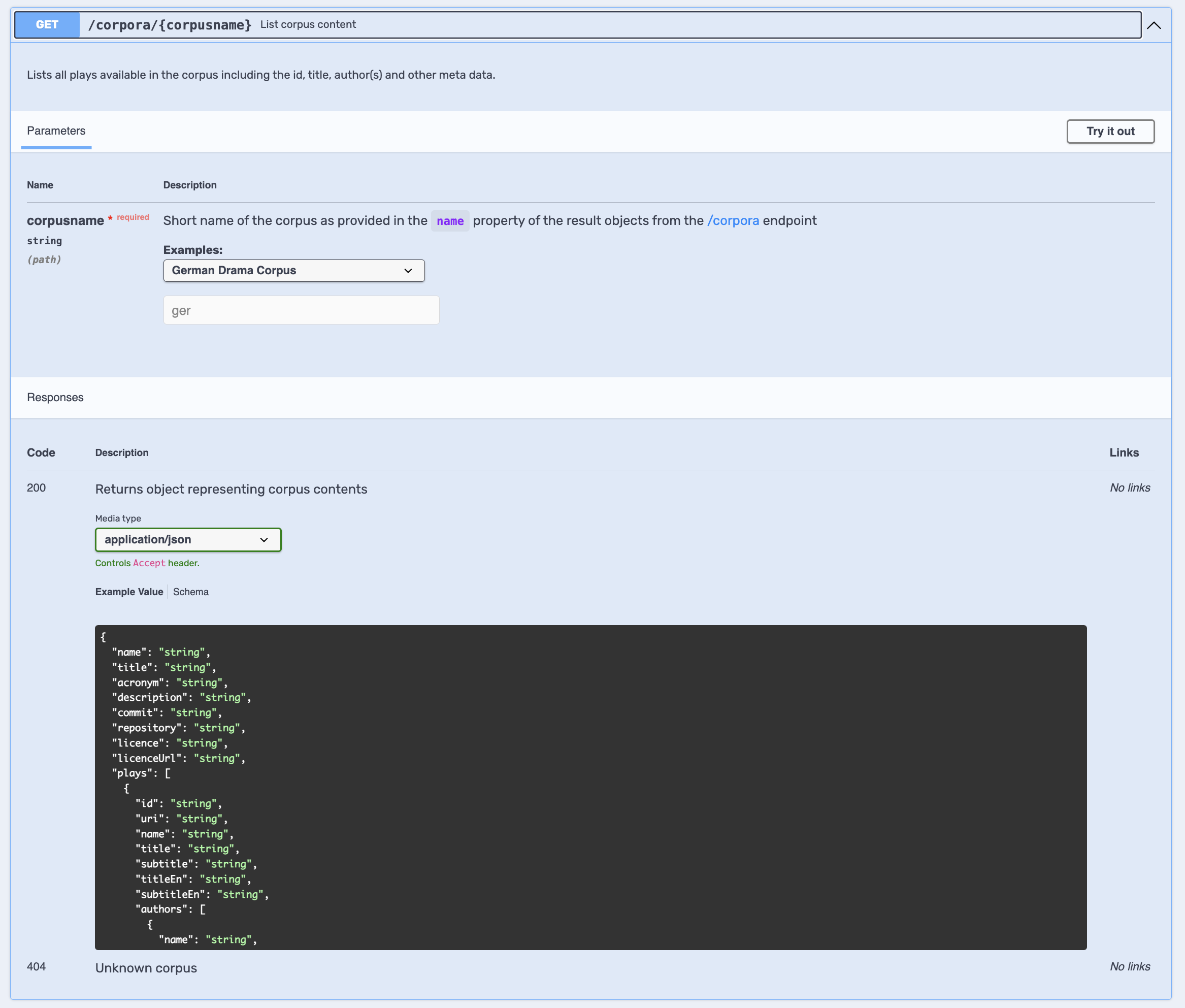
Fig. 19 The /corpora/{corpusname} endpoint. The path parameter corpusname is required (marked with a red asterisk). The description explains where to get valid values and the examples dropdown offers pre-filled corpus identifiers. Note also the 404 “Unknown corpus” response at the bottom — we get this when supplying an invalid corpus name.#
In the Swagger UI, the parameter section shows a description: “Short name of the corpus as provided in the name property of the result objects from the /corpora endpoint.” In other words, the output of our previous request (the name field) becomes the input of this request. This pattern — the output of one request feeds as input into the next — is not specific to DraCor but fundamental to working with REST APIs in general. Most APIs organise their resources hierarchically, and navigating that hierarchy means using identifiers obtained from one response to construct the next request. Once we grasp this pattern, we can apply it to any API we encounter.
The response this time is not an array but a single JSON object. It contains corpus-level metadata (title, description, repository link) and, importantly, a field called plays — an array of play objects, each with its own metadata including a name field (the play identifier, or “slug”).
Step 2: Getting a Single Play#
To retrieve data about a specific play, we use the endpoint /corpora/{corpusname}/plays/{playname}. This endpoint has two required path parameters: the corpus name and the play name. Both must be valid, and the play must belong to the specified corpus.
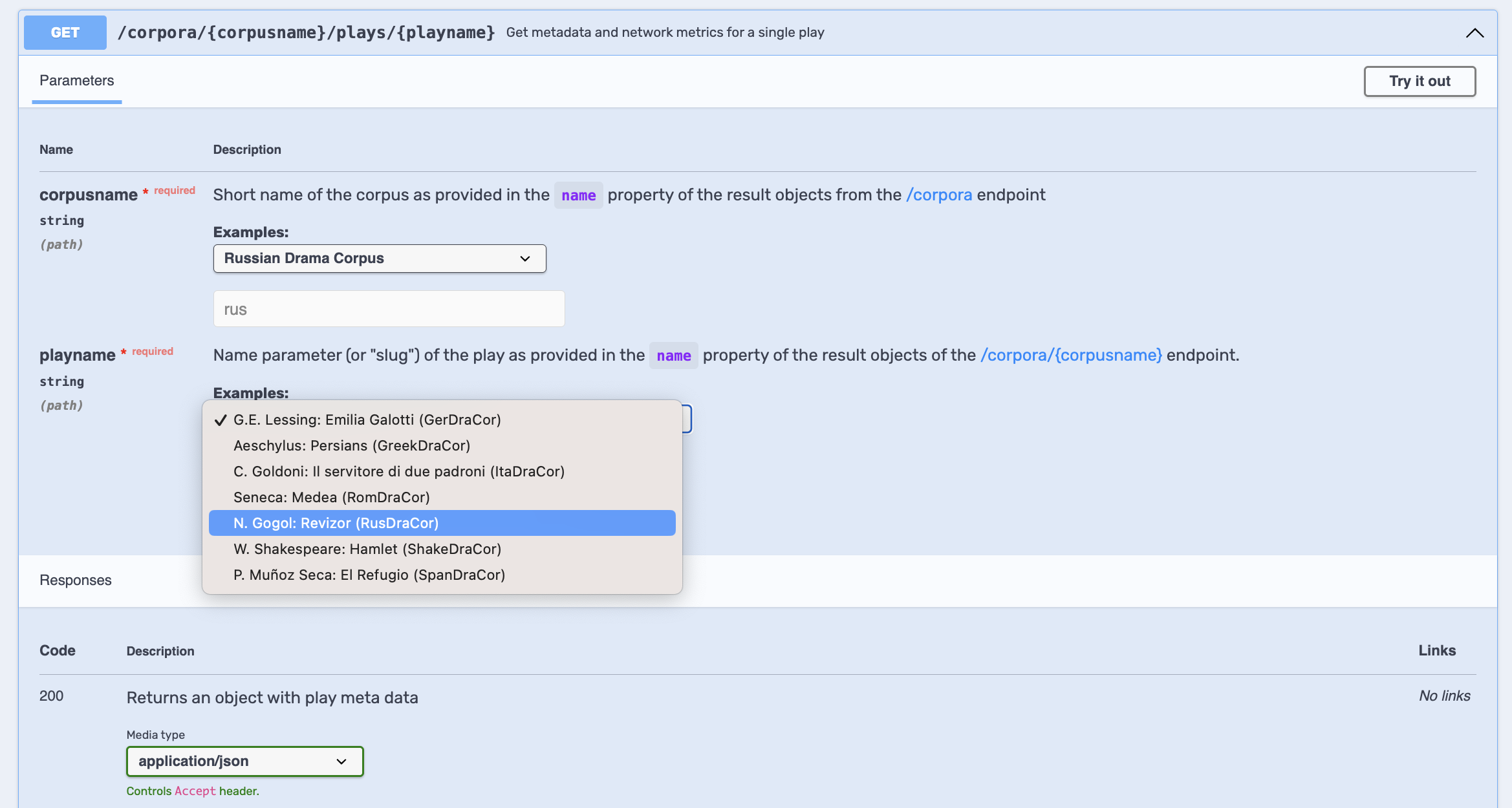
Fig. 20 The play endpoint with its two required path parameters. Here, the corpus name is set to the Russian Drama Corpus (rus) and the play-name dropdown shows example values from different corpora. The examples are not filtered by the selected corpus, so we must take care to choose a play that actually belongs to the corpus we specified.#
The full identifier flow is therefore a three-step cascade:
/corpora→ returns a list of corpora; find thenamefield (e.g."ger")/corpora/ger→ returns corpus details including plays; find thenamefield of a play (e.g."lessing-emilia-galotti")/corpora/ger/plays/lessing-emilia-galotti→ returns metadata and network metrics for that play
What happens if we get the identifiers wrong? Every API response includes an HTTP status code — a three-digit number that tells us what happened. So far, all our requests returned 200 OK, meaning the request was successful. But if we request https://dracor.org/api/v1/corpora/rus/plays/hamlet, we receive a 404 Not Found error — because Hamlet is not in the Russian Drama Corpus. A play identifier only works within its own corpus.
The Swagger UI allows us to freely combine example values from different corpora (as we saw in the screenshot above), which can easily lead to such mismatches. We should always verify that the play we are requesting belongs to the corpus we specified.
To return to our library analogy: status codes are like the librarian’s responses. “Here is your book” (200 OK), “We don’t have that book” (404 Not Found), “I don’t understand what you are asking for” (400 Bad Request), or “Our catalogue system is currently down, please come back later” (500 Internal Server Error).
Status codes are grouped by their first digit, which tells us the category of the response:[3]
2xx — Success. The request worked. The most common is 200 OK.
4xx — Client error. Something is wrong with our request — a typo in the URL, a missing parameter, or a resource that does not exist. Common codes: 400 Bad Request, 404 Not Found.
5xx — Server error. The server encountered a problem — this is not our fault. Common code: 500 Internal Server Error.
We do not need to memorise all status codes. The key insight is: if the first digit is 2, we are fine; if it is 4, we should check our request; if it is 5, the problem is on the server side. For each endpoint, the DraCor OpenAPI specification lists the possible status codes and their meaning — we can see them in the Responses section of the Swagger UI. This is a good place to check if something goes wrong with a request.
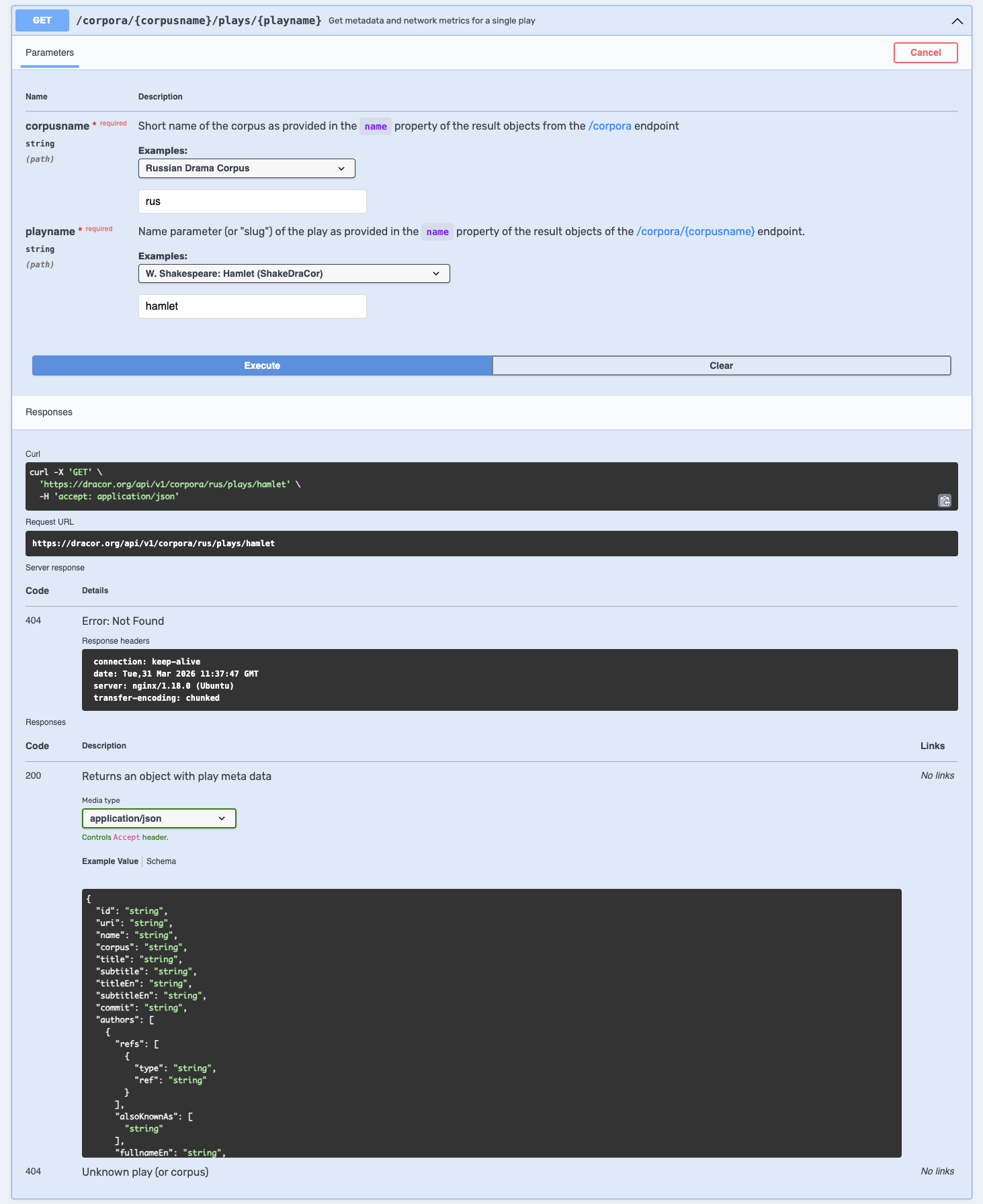
Fig. 21 A 404 Not Found error in action. The corpus name is set to the Russian Drama Corpus (rus), but the play name hamlet (from ShakeDraCor) does not exist in this corpus.#
In Python, we can check the status code of a response and react accordingly:
import requests

url = "https://dracor.org/api/v1/corpora/rus/plays/hamlet"
response = requests.get(url)

if response.status_code == 200:
    play_data = response.json()
    print(f"Play title: {play_data['title']}")
else:
    print(f"Request failed with status code: {response.status_code}")
Let us walk through this:
We send a GET request to an endpoint that we suspect might not work (Hamlet in the Russian Drama Corpus).
response.status_codegives us the HTTP status code as a number (an integer) that we can compare — in this case,404.The
ifstatement checks whether the status code is200(success). This is a conditional in Python: the indented code afterifonly runs when the condition is true; otherwise, the code afterelseruns.Since Hamlet is not in RusDraCor, we get the output:
Request failed with status code: 404.
This pattern — check the status code before processing the data — is good practice whenever we make API requests programmatically. It prevents our code from crashing when a request fails unexpectedly.
From Front-end URL to API URL#
If we are browsing the DraCor front-end and find a play we want to analyse, we can extract both identifiers directly from the front-end URL. For example:
Front-end:
https://dracor.org/ger/lessing-emilia-galottiAPI:
https://dracor.org/api/v1/corpora/ger/plays/lessing-emilia-galotti
The front-end URL contains the corpus name (ger) and the play name (lessing-emilia-galotti) in the same order. Converting between the two is straightforward and provides a useful bridge between the exploratory browsing of Chapter 4 and the programmatic access of this chapter.
# Converting a front-end URL to an API URL
frontend_url = "https://dracor.org/ger/lessing-emilia-galotti"
parts = frontend_url.replace("https://dracor.org/", "").split("/")
corpusname, playname = parts[0], parts[1]

api_url = f"https://dracor.org/api/v1/corpora/{corpusname}/plays/{playname}"
print(api_url)
# https://dracor.org/api/v1/corpora/ger/plays/lessing-emilia-galotti
This short example introduces some useful Python string manipulation:
.replace("https://dracor.org/", "")removes the base URL from the string, leaving just"ger/lessing-emilia-galotti". The.replace()method substitutes one piece of text with another — here, we replace the base URL with an empty string, effectively stripping it away..split("/")splits the remaining string at every/character, producing a list:["ger", "lessing-emilia-galotti"]. The.split()method breaks a string into parts based on a separator.corpusname, playname = parts[0], parts[1]assigns the first and second elements of the list to two variables. In Python,parts[0]means “the first item” (indexing starts at 0).The
f"..."syntax is a formatted string (or “f-string”): the expressions inside{corpusname}and{playname}are replaced with the values of those variables, producing the final API URL.
5.4. What Data Can We Get for a Play?#
Once we have navigated to a specific play, a range of endpoints branch off from the play path. There is no single endpoint that returns everything about a play — instead, different endpoints provide different types of data. The following table summarises the most important play-level endpoints:
Endpoint suffix |
What it returns |
Format(s) |
|---|---|---|
(none) |
Play metadata and network metrics |
JSON |
|
Full TEI/XML source document |
XML |
|
Plain text of the play |
plain text |
|
List of characters with metadata |
JSON or CSV |
|
Character list as CSV |
CSV |
|
Spoken text (excluding stage directions) |
plain text |
|
Spoken text grouped by character |
JSON or CSV |
|
Stage directions |
plain text |
|
Stage directions with speaker labels |
plain text |
|
Co-occurrence network metrics |
JSON |
|
Network data as edge list |
CSV |
|
Network data for Gephi |
XML (GEXF) |
|
Network data in GraphML |
XML (GraphML) |
Note that most endpoints return a single format. Two endpoints — /characters and /spoken-text-by-character — can return either JSON or CSV. How do we tell the API which format we want? Remember the library analogy: we hand over the call number and attach a note saying “photocopy, please.” In API terms, this is called content negotiation: we include an Accept header in our request that specifies the desired format. For example, to request the character list as CSV instead of JSON:
import requests

url = "https://dracor.org/api/v1/corpora/ger/plays/lessing-emilia-galotti/characters"

# Request JSON (the default)
response_json = requests.get(url, headers={"Accept": "application/json"})

# Request CSV
response_csv = requests.get(url, headers={"Accept": "text/csv"})
print(response_csv.text)
Let us unpack what is new here. We already know requests.get(url) from earlier, but this time we pass an additional keyword argument: headers={"Accept": "text/csv"}. In Python, keyword arguments (written as name=value) let us provide optional information to a function — a reusable block of code that performs a specific task. We have already been using functions: requests.get() is a function that sends an HTTP GET request, and print() is a function that displays text. Functions accept inputs (called arguments) and often return a result. Here, we are passing a dictionary of HTTP headers that will be sent along with our request.
The value "text/csv" is a MIME type (also called Internet media type) — a standardised label that identifies the format of data on the internet. Common MIME types include application/json for JSON data, text/csv for CSV tables, text/plain for plain text, and application/xml for XML documents. When we set the Accept header to a specific MIME type, we are telling the server: “please send me the data in this format.” This is our “photocopy, please” note from the library analogy.
All of these endpoints require the same two path parameters ({corpusname} and {playname}) that we used in the previous section. The base path is always /api/v1/corpora/{corpusname}/plays/{playname}/.
The network data endpoints illustrate a practical approach to content negotiation: the same network data is available in CSV, GEXF, and GraphML, but rather than using HTTP headers to select the format, the format appears in the URL path. This is a pragmatic design choice — it makes each format directly linkable and shareable.
How to find out what an endpoint returns
Rather than memorising the table above, we recommend learning to read the schema in the Swagger UI. For each endpoint, the response section shows both an example value and a formal schema describing the structure and types of all fields. The schema is the most reliable guide to what data is available from a given endpoint. For a comprehensive overview of all data points (“features”) returned by the DraCor API — organised by corpus, play, segment, and character — see the feature tables in [BornerT23] (pp. 37–44), with updates in [BornerTSG25].
Rather than walking through each endpoint individually, let us see some of them in action. The following URLs can be pasted directly into a browser to retrieve different types of data for Schiller’s Wilhelm Tell in GerDraCor:
https://dracor.org/api/v1/corpora/ger/plays/schiller-wilhelm-tell/tei
https://dracor.org/api/v1/corpora/ger/plays/schiller-wilhelm-tell/stage-directions
https://dracor.org/api/v1/corpora/ger/plays/schiller-wilhelm-tell/spoken-text?sex=FEMALE
https://dracor.org/api/v1/corpora/ger/plays/schiller-wilhelm-tell/metrics
The third example uses a query parameter on the /spoken-text endpoint: ?sex=FEMALE filters the spoken text to include only lines spoken by female characters. This endpoint also supports filtering by role and by character relations (e.g. ?relation=siblings), although these more advanced filters depend on what is encoded in the source TEI of each corpus.
5.5. Research at Scale: Corpus Metadata Analysis#
So far, everything we have done with Python could also be done in the Swagger UI or the browser — we sent a request, received a response, and inspected the result. The real power of programmatic access emerges when we go beyond what the Swagger UI can do: loading data into tables, filtering and transforming it, iterating over hundreds of plays, and producing visualisations. This is the point where using the API becomes genuinely different from browsing the front-end — we can ask questions of an entire corpus, not just a single play.[4]
Loading Corpus Metadata as a Table#
The endpoint /corpora/{corpusname}/metadata returns detailed metadata for every play in a corpus. By requesting it as CSV (using the Accept header we just learned about), we can load it directly into a table using the Python library pandas. Pandas is a widely used package for working with tabular data — think of it as a programmable spreadsheet. It can be installed with pip install pandas.
The central data structure in pandas is the DataFrame: a table with rows and columns, similar to a spreadsheet or a CSV file. We can filter, sort, and plot data in a DataFrame with just a few lines of code.
# pandas needs to be installed: pip install pandas
import requests
import pandas as pd  # import pandas and use "pd" as a shorthand

# Set the base URL and corpus name
API_URL = "https://dracor.org/api/v1/"
corpusname = "ger"

# Request metadata as CSV using content negotiation
response = requests.get(
    API_URL + "corpora/" + corpusname + "/metadata",
    headers={"Accept": "text/csv"},  # ask for CSV format
    stream=True  # stream the response (needed for reading it as a file)
)
response.raise_for_status()
response.raw.decode_content = True  # ensure the raw response is decoded properly

# Load the CSV data into a pandas DataFrame
metadata_df = pd.read_csv(response.raw, sep=",", encoding="utf-8")

# Display the first five rows of the table
metadata_df.head()
Let us walk through the new parts:
import pandas as pd— we import the pandas library and give it the shorthand namepd, which is a common convention.stream=True— this tellsrequeststo stream the response rather than loading it all into memory at once, which is needed so that pandas can read it directly as a file.response.raw.decode_content = True— a technical detail that ensures the raw response data is decoded properly before pandas reads it.pd.read_csv(response.raw, sep=",", encoding="utf-8")— this reads the CSV data from the response and creates a DataFrame. Thesep=","specifies that columns are separated by commas, andencoding="utf-8"ensures that special characters (such as umlauts in German play titles) are handled correctly.metadata_df.head()— displays the first five rows of the table, giving us a quick preview.
The resulting table has one row per play and columns for metadata fields such as yearNormalized, wordCountText, wordCountStage, numOfSpeakers, numOfSpeakersFemale, size (number of characters), and many more.
Now that we have the data in a DataFrame, we can work with it like a programmable spreadsheet. Here are two quick examples to get a feel for what pandas can do:
# How many plays are in the corpus?
len(metadata_df)

# What are the column names (i.e. what data do we have)?
metadata_df.columns
# Sort plays by word count (longest first) and show the top 5
metadata_df.sort_values(by="wordCountText", ascending=False).head()
# Filter: only plays written after 1800
plays_after_1800 = metadata_df[metadata_df["yearNormalized"] > 1800]
print(f"Number of plays after 1800: {len(plays_after_1800)}")
In the first example, len() gives us the number of rows (plays), and .columns lists all available fields — useful for discovering what data the API has provided. In the second, .sort_values() sorts the table by a column and .head() shows the first five rows — just like sorting a spreadsheet column and looking at the top entries. In the third, we filter rows using a condition inside square brackets: metadata_df["yearNormalized"] > 1800 selects only the rows where the year is greater than 1800. These operations — sorting, filtering, counting — are the bread and butter of working with tabular data in pandas.
A note on performance
The /metadata endpoint returns data for all plays in a corpus in a single response. For large corpora like FreDraCor (several thousand plays), this can be slow. This is a known trade-off in the DraCor API design — convenient for quick analyses but costly for large datasets.
Example Analysis: Stage Directions over Time#
With the metadata in a DataFrame, corpus-level analyses become straightforward. For example, we can calculate the proportion of stage-direction tokens relative to the total word count for each play and plot it over time:
# Calculate the proportion of stage directions relative to total word count
metadata_df["stageProportion"] = metadata_df["wordCountStage"] / metadata_df["wordCountText"]

# Plot the result as a scatter plot
metadata_df.plot(x="yearNormalized", y="stageProportion", kind="scatter")
Let us walk through this:
metadata_df["wordCountStage"] / metadata_df["wordCountText"]— this divides two columns element-wise: for each play, the number of words in stage directions is divided by the total number of words, giving us a ratio between 0 and 1. Pandas lets us perform mathematical operations on entire columns at once, just as a spreadsheet formula can be applied to a whole column.metadata_df["stageProportion"] = ...— the result is stored in a new column called"stageProportion", which is added to the DataFrame automatically..plot(x="yearNormalized", y="stageProportion", kind="scatter")— this creates a scatter plot using the built-in plotting functionality of pandas. Thexandyparameters specify which columns to use for the horizontal and vertical axes. Thekind="scatter"parameter tells pandas to draw individual points rather than a line. Each point represents one play, positioned by its year (x-axis) and its stage-direction proportion (y-axis).
This visualisation reveals how the proportion of stage directions in dramatic texts has evolved historically — a question that would be impractical to answer by inspecting plays one by one in the front-end. The DraCor API makes it straightforward to extract stage directions for further analysis.[5]
Example Analysis: Female Speakers over Time#
Similarly, we can examine the proportion of female speakers across the corpus:
# Calculate the ratio of female speakers to all speakers
metadata_df["femaleSpeakerRatio"] = metadata_df["numOfSpeakersFemale"] / metadata_df["numOfSpeakers"]

# Plot the result
metadata_df.plot(x="yearNormalized", y="femaleSpeakerRatio", kind="scatter")
This follows the same pattern as before: we divide two columns to create a new ratio (numOfSpeakersFemale / numOfSpeakers), store it in a new column, and plot it over time. The result shows, for each play, what proportion of its speaking characters are female — a simple but revealing perspective on gender representation across centuries of dramatic writing.
Iterating over Plays#
Some analyses require data that is not in the metadata table. For example, if we want to know how many words are spoken by male versus female characters across an entire corpus, we need to look at individual characters. The metadata table tells us how many speakers of each gender a play has, but not how much each of them speaks.
The /characters endpoint returns a list of characters for a single play, including fields like numOfWords (the number of words spoken), numOfSpeechActs, sex (MALE, FEMALE, or UNKNOWN), and network metrics. To aggregate this across a whole corpus, we iterate over all plays:
# Get the list of plays in the corpus
corpus_data = requests.get(API_URL + "corpora/" + corpusname).json()

# Counters for words spoken by male and female characters
words_male = 0
words_female = 0

# Iterate over each play
for play in corpus_data["plays"]:
    # Build the URL for the characters endpoint
    url = API_URL + "corpora/" + corpusname + "/plays/" + play["name"] + "/characters"
    response = requests.get(url)
    response.raise_for_status()
    characters = response.json()

    # Each item in the response represents one character
    for character in characters:
        if character["sex"] == "FEMALE":
            words_female += character["numOfWords"]
        elif character["sex"] == "MALE":
            words_male += character["numOfWords"]

print(f"Words spoken by female characters: {words_female}")
print(f"Words spoken by male characters: {words_male}")
Let us walk through the new elements:
We first get the list of plays from the
/corpora/{corpusname}endpoint, as we learned earlier.The
for play in corpus_data["plays"]:loop iterates over every play in the corpus. For each play, we build the URL to the/charactersendpoint using itsnamefield.The response is a list of objects, one per character. Each character object contains, among other fields,
numOfWords(how many words this character speaks) andsex.We use
if/elifto add the word count to eitherwords_femaleorwords_maledepending on the character’ssexfield.+=is a shorthand for “add this value to the existing total” — sowords_female += character["numOfWords"]adds this character’s word count to the running total.
Notice what we did not have to do: we did not download the TEI source files, parse the XML, identify which text belongs to which character, split it into tokens, and count them. The API has already done this work for us — the numOfWords value is pre-calculated and ready to use. This is the bootstrapping function of the API that we introduced in the Theoretical Background: it provides pre-processed, structured data so that our research can start at a higher level.
This pattern — iterating over plays and calling an endpoint for each one — is common when working with the DraCor API. It illustrates both the power of programmatic access (we can process hundreds of plays automatically) and a practical consideration: making many individual requests can be slow, especially for large corpora.
A note on API design: chunky vs. chatty
The iteration pattern above raises a question of API design. To get character data for all plays in a corpus, we make one request per play — potentially hundreds of requests. This is what API designers call a “chatty” approach: many small, precise requests. The alternative would be a “chunky” approach: a single endpoint that returns all character data for an entire corpus in one response. The DraCor API tends towards the chunky style in some places — for example, the /corpora/{corpusname} endpoint returns corpus metadata and a list of all plays in one response. This is convenient but can lead to overfetching: we receive more data than we need. The /metadata endpoint we used earlier is another example — it returns detailed data for every play at once, which is why it can be slow for large corpora. There is no single right answer; both styles have trade-offs, and the DraCor API uses a pragmatic mix of both.
5.6. Using PyDraCor (and rdracor)#
In the previous sections, we built API URLs manually, sent requests with requests.get(), and parsed the JSON responses ourselves. This works well for learning and for understanding what happens at the HTTP level, but it can become repetitive. An API wrapper is a programming library that simplifies this process by wrapping API calls into functions (reusable blocks of code, as we have seen) and classes — blueprints for creating objects that bundle data and functionality together. For example, a Play class might hold a play’s metadata and offer methods like .get_spoken_text() — that feel native to the programming language.
For the DraCor API, two such wrappers exist: PyDraCor for Python and rdracor for R [SluyterGathjeTBorner23].
PyDraCor#
PyDraCor, developed by Henny Sluyter-Gäthje, is the official Python wrapper for the DraCor API. It provides a set of Python classes that map directly to the core entities of the API — corpora, plays, and characters — so that we can work with DraCor data using familiar Python patterns instead of constructing URLs and parsing JSON manually. PyDraCor can be installed with:
pip install pydracor
Its main classes — DraCor, Corpus and Play — mirror the structure of the API itself. Let us walk through them step by step.
Getting Started#
from pydracor import DraCor

# Initialise — points to dracor.org by default
dracor = DraCor()
Here, DraCor() creates an object — an instance of the DraCor class. This object, which we store in the variable dracor, knows how to communicate with the DraCor API. We no longer need to construct URLs or manage requests ourselves.
Listing Corpora and Getting a Corpus#
# List corpora
corpora = dracor.get_corpora()
for corpus in corpora:
    print(corpus.name, corpus.title)

# Get a single corpus
corpus = dracor.get_corpus("ger")
dracor.get_corpora() does the same thing as our earlier requests.get(API_URL + "corpora") — but we do not need to build the URL or parse the JSON. The result is a list of corpus objects, and we can access their properties directly with corpus.name and corpus.title (using dot notation instead of dictionary brackets).
Working with a Play#
# Get a play — using the same two identifiers we learned earlier
play = dracor.get_play("ger", "lessing-emilia-galotti")

# Get spoken text by female characters
text = play.get_spoken_text(sex="FEMALE")
dracor.get_play("ger", "lessing-emilia-galotti") takes the same two identifiers — corpusname and playname — that we used throughout this chapter. PyDraCor handles the URL construction (/api/v1/corpora/ger/plays/lessing-emilia-galotti) internally. The result is a Play object that we can then query further.
play.get_spoken_text(sex="FEMALE") is a method — a function that belongs to the Play object. Behind the scenes, it constructs the URL, adds the query parameter, sends the request, and returns the result. Compare this with the equivalent raw requests code:
# The same thing with requests — more explicit, more verbose
url = "https://dracor.org/api/v1/corpora/ger/plays/lessing-emilia-galotti/spoken-text"
response = requests.get(url, params={"sex": "FEMALE"})
response.raise_for_status()
text = response.text
The PyDraCor version is shorter and reads more naturally — play.get_spoken_text(sex="FEMALE") is immediately understandable — while the requests version makes the underlying HTTP mechanics visible.
Metrics and Metadata#
# Get network metrics
metrics = play.get_metrics()
print(metrics.average_degree)

# Filter plays in a corpus
plays_after_1800 = [p for p in corpus.plays if p.year_normalized > 1800]

# Get metadata as a DataFrame
import pandas as pd
metadata = corpus.metadata()
metadata_df = pd.DataFrame([m.to_dict() for m in metadata])
metrics.average_degree shows how PyDraCor makes API data feel like native Python: instead of navigating a dictionary (data["averageDegree"]), we access a property on an object. The filtering example uses a Python list comprehension — a compact way of writing a loop that selects items matching a condition.
Compared to the raw requests approach, PyDraCor handles URL construction, HTTP requests, and JSON parsing behind the scenes. The code reads more naturally: play.get_spoken_text(sex="FEMALE") is immediately understandable, whereas the equivalent raw URL (https://dracor.org/api/v1/corpora/ger/plays/lessing-emilia-galotti/spoken-text?sex=FEMALE) requires more effort to construct and parse.
PyDraCor 3.x has a two-layer architecture: a core package (pydracor-base) is auto-generated from the DraCor OpenAPI specification, helping it remain in sync with the API. The main pydracor package then wraps this core with convenience functions [BornerTSG25].
This was only a brief introduction to PyDraCor. For more examples and the full list of available methods, see the PyDraCor README on GitHub.
PyDraCor can also point to a local DraCor instance, which is relevant for reproducible research setups (see Chapter 6):
dracor = DraCor(host="http://localhost:8088/api/v1")
rdracor for R#
rdracor is an R wrapper for the DraCor API, developed by Ivan Pozdniakov. It is published on CRAN and can be installed with install.packages("rdracor"). Like PyDraCor, it provides functions that map to the API endpoints, making it easy to retrieve corpora, plays, character data and network information directly from within R. The following example loads the metadata for GerDraCor and plots the proportion of stage directions over time:
library(rdracor)
metadata <- get_corpus_metadata("ger")
plot(metadata$yearNormalized, metadata$wordCountStage / metadata$wordCountText)
Both API libraries demonstrate a key point: because the DraCor API follows REST conventions and is documented with OpenAPI, it can be accessed from any programming language. The API is the shared interface; the wrapper is a convenience layer on top.
API versioning
The DraCor API moved from version 0 to version 1 in December 2023. All examples in this chapter use version 1 (URLs containing /api/v1/). If you encounter older tutorials or notebooks that use URLs without /v1/ in the path, or with /play/ (singular) instead of /plays/, or cast instead of characters, these use the legacy v0 API. Always use v1 for new work. The v1 in the URL explicitly selects the API version, and version 0 may be removed in the future.
Things to keep in mind
Data depends on encoding quality. The API extracts from the TEI source. If the encoding is inconsistent or incomplete (e.g. missing gender attributes on characters), the API results reflect that. The API does not add information that is not in the source.
DraCor is a living system. Corpora are updated, plays added or corrected. Results from today may differ from results in six months. For reproducible research, consider using a local DraCor instance with pinned data (see Chapter 6).
No search endpoint. There is currently no way to search across plays by criteria (e.g. “all plays with more than 20 characters”). We must fetch metadata and filter on the client side.
Network metrics are pre-calculated. They are computed when a play is loaded into the database, based on the segmentation of the text. They are not recalculated on each request.
6. Exercises#
Self-test
Open the Self-test: API.
7. Teaching Notes#
This chapter works well as a 90-minute practical session in which learners move gradually from guided exploration to independent API use. A useful rhythm is: first, a short instructor-led demonstration of the Swagger UI and one simple endpoint, such as /corpora; second, paired work in which students complete an “API request note” for one endpoint, recording the endpoint, required identifiers, parameters, response format, status code, and one possible research use; third, a short comparison round in which pairs explain how their endpoint turns a textual object into structured data. This helps students practise the central logic of the chapter: moving from corpus to play identifiers, reading JSON responses, and understanding the API as the programmatic layer behind the front-end. For beginners, the activity can stay entirely in the browser and Swagger UI; for more advanced groups, the same endpoint can then be called with curl or Python.
Lecturers may also use this chapter as a bridge from interface-based exploration to reproducible computational work. In a 90–120 minute lab, students can first call the same DraCor endpoint in three ways: Swagger UI, browser URL, and Python with requests. They can then adapt a prepared code cell to retrieve metadata for one corpus, inspect the resulting table, and formulate a small research question, for example about chronology, character counts, or the relation between spoken text and stage directions. The session should include a short debugging phase in pairs, because interpreting errors, status codes, missing identifiers, and malformed URLs is part of learning how APIs work. A useful closing task is to ask each group to write one sentence beginning “The API makes it possible to…”, and one sentence beginning “The API does not solve…”. This keeps the focus on both affordances and limitations, including encoding quality, versioning, and reproducibility.
8. Further Reading and Resources#
DraCor API documentation (Swagger UI): https://dracor.org/doc/api
Henny Sluyter-Gäthje’s API tutorial notebook: dracor-notebooks on GitHub
Spadini, Elena and Peter Dängeli. “Introduction to APIs (for DH).” Presentation at the RESED Workshop, Zurich, January 2026.
Hall, Mark. “Introduction to APIs.” DARIAH Campus, 2021. https://campus.dariah.eu/resources/hosted/introduction-to-apis
Massé, Mark. REST API Design Rulebook. O’Reilly Media, 2011. A practical guide to REST API design principles and conventions.
ExploreCor: Using Programmable Corpora in Computational Literary Studies (CLS INFRA Training School). DARIAH Campus
9. Glossary Entries#
Term |
Definition |
|---|---|
API (Application Programming Interface) |
A structured interface that allows software to request data or services from another system. |
REST (Representational State Transfer) |
An architectural style for web APIs based on resources, HTTP methods, and stateless interactions. |
Endpoint |
A specific URL where a particular resource or function of an API can be accessed. |
Request |
A message sent to an API endpoint, specifying what data or action is wanted. |
Response |
The data (body) and metadata (headers) returned by the API after a request. |
HTTP method (GET, POST, …) |
The verb specifying what action to perform. GET retrieves data without changing anything on the server. |
Status code |
A three-digit number indicating the result of a request (e.g. 200 = success, 404 = not found). |
JSON (JavaScript Object Notation) |
A lightweight data format using key-value pairs and arrays, widely used in API responses. |
Path parameter |
A variable part of the URL that identifies a specific resource (e.g. |
Query parameter |
A key-value pair appended after |
OpenAPI / Swagger |
A standard for describing REST APIs; Swagger UI renders the specification as interactive documentation. |
API wrapper |
A programming library that simplifies working with an API from a specific programming language. |
Content negotiation |
The mechanism by which a client and server agree on the format of the response data. |
MIME type (Internet media type) |
A standardised label that identifies the format of data (e.g. |
Client |
Any software that sends requests to an API — a browser, a Python script, or a front-end application. |
Server |
The system that receives API requests, processes them, and sends back responses. |
Corpusname |
The short identifier of a DraCor corpus (e.g. |
Playname (slug) |
The short identifier of a play within a DraCor corpus (e.g. |
DataFrame |
A tabular data structure in the Python library pandas, similar to a spreadsheet, with rows and columns. |
Bootstrapping (in the API context) |
The API provides pre-processed data (e.g. word counts, network metrics) so that research can start at a higher level without re-implementing extraction and calculation steps. |
Overfetching |
Receiving more data in an API response than is needed for a specific task, typically a trade-off of convenience endpoints. |
10. Next Steps#
Continue with: Chapter 6, “Infrastructure” to understand the main components that build the infrastructure of DraCor, and how to run it locally with Docker.
11. AI Use Declaration#
This chapter was drafted with the assistance of a large language model (Claude, Anthropic). The author dictated content via voice input, which was transcribed and used as the basis for an interview-style dialogue with the LLM. The model structured and edited the spoken input into chapter prose. A retrieval-augmented generation (RAG) system containing key literature on DraCor — in particular the CLS INFRA reports D7.1 [BornerT23], D7.2 [SluyterGathjeTBorner23] and D7.4 [BornerTSG25] — was used to retrieve relevant passages and verify factual claims. The model also assisted with summarisation, spelling and grammar checking, code explanation and testing, as well as formatting for MyST Markdown. All content was reviewed and edited by the author.
13. References#
Ingo Börner and Peer Trilcke. CLS INFRA D7.1 On Programmable Corpora. 2023. doi:10.5281/zenodo.7664964.
Ingo Börner, Peer Trilcke, Daniil Skorinkin, and Luca Giovannini. CLS INFRA D7.4 Report on the Implementation of Programmable Corpora. 2025. doi:10.5281/zenodo.15301341.
Roy Thomas Fielding. Architectural Styles and the Design of Network-Based Software Architectures [PhD thesis]. PhD thesis, University of California, Irvine, 2000. URL: https://www.ics.uci.edu/~fielding/pubs/dissertation/fielding_dissertation.pdf (visited on 2026-05-20).
Frank Fischer, Ingo Börner, Mathias Göbel, Angelika Hechtl, Christopher Kittel, Carsten Milling, and Peer Trilcke. Programmable Corpora: Introducing DraCor, an Infrastructure for the Research on European Drama. In DH 2019 Book of Abstracts. Utrecht University, Utrecht, 2019. Zenodo. URL: https://zenodo.org/record/4284002 (visited on 2026-02-17), doi:10.5281/ZENODO.4284002.
Mark Massé. Rest API Design Rulebook: Designing Consistent Restful Web Service Interfaces. O'Reilly, Beijing et al., 2011. ISBN 978-1-4493-1050-9.
Peer Trilcke, Christopher Kittel, Nils Reiter, Daria Maximova, and Frank Fischer. Opening the Stage: A Quantitative Look at Stage Directions in German Drama. In Laura Estill, Jennifer Guiliano, and Constance Crompton, editors, DH2020 Book of Abstracts. University of Ottawa, Ottawa, 2020. University of Ottawa. URL: https://dh2020.adho.org/wp-content/uploads/2020/07/337_OpeningtheStageAQuantitativeLookatStageDirectionsinGermanDrama.html (visited on 2026-04-12).
Henny Sluyter-Gäthje, Peer Trilcke, and Ingo Börner. CLS INFRA D7.2 Report on API Libraries for R and Python for the Programmable Corpora Prototype "DraCor": "rdracor" and "pydracor". 2023. doi:10.5281/zenodo.15302236.