
Infrastructure#
Chapter metadata
Author: Ingo Börner
Version: 0.2 (2026-09-14)
Review status: Revised
Reviewer: Antonio Rojas Castro
Note
How to use this chapter: The first part is conceptual — we look at what DraCor is as a system and why understanding infrastructure matters for research. The second part is practical — we set up a local DraCor instance using Docker, load a corpus, and connect it to the API skills from Chapter 5. If Docker is not available on your machine, the conceptual sections still stand on their own.
1. Overview#
In the previous chapters we used DraCor through its front-end (Chapter 4) and its API (Chapter 5). We learned to browse corpora, retrieve data, and analyse plays programmatically. But we treated DraCor as a given — a service available at dracor.org that simply works. In this chapter, we open the box.
What is DraCor, technically? Not a single application, but a system — a set of interconnected services, maintained by a community, funded by research projects, and embedded in a broader European infrastructure landscape. Understanding this matters for at least three reasons. First, it builds trust: if we base our research on a system, we should understand what it is and who keeps it running. Second, it enables adaptation: knowing the components means we can run DraCor locally, load our own corpora, and tailor it to our research needs. Third, it fosters critical awareness: the data and metrics we retrieve through the API are not simply “there” — they are produced by specific software components, from specific encodings, through specific processes. Understanding this makes us better researchers.
2. Requirements and Competences#
Familiarity with the DraCor front-end (Chapter 4) and the API (Chapter 5).
For the practical sections: Docker installed on your machine.
No programming required for the conceptual sections.
3. Learning Outcomes#
After completing this chapter, learners will be able to:
Explain what a research infrastructure is and why it matters for Computational Literary Studies.
Describe the main components of the DraCor system and how they interact.
Identify the human actors and community structures that sustain DraCor.
Explain why running DraCor locally is useful for research and reproducibility.
Set up a local DraCor instance using Docker.
Load a corpus into a local DraCor instance and use it with the API.
4. Theoretical Background#
4.1. What Is a Research Infrastructure?#
The term “infrastructure” often evokes images of large-scale systems — servers, data centres, networks. But in the humanities, infrastructure is something both more modest and more interesting. In this chapter, when we speak of research infrastructure, we mean primarily the technical systems — the software components, services, and data stores — that make a platform like DraCor work. But we will also see that infrastructure cannot be separated from the people who build and maintain it: the developers, editors, and community of contributors without whom the technical system would quickly become unusable.
We tend not to think about infrastructure when it works — we simply use the front-end, call the API, download a file. It becomes visible when something breaks, when we need to understand where a value comes from, or when we want to adapt the system for our own purposes. This chapter is about making the infrastructure visible — not because it is broken, but because understanding it makes us better users and more critical researchers.
A small example: DraCor has no search function. We cannot type a keyword and find all plays that mention “revolution” or all characters named “Maria.” For anyone used to modern web applications, this feels like a missing feature — and it is. But it is also a window into the infrastructure. The core of DraCor is an XML database (eXist-db) with an API designed around the two entities corpus and play. Full-text search was never built into this design; what was built in is the ability to extract and serve specific layers of a text — spoken text, stage directions, network data. This is a deliberate architectural choice, shaped by the research questions that drove DraCor’s development. DraCor grew out of the DLINA project (Digital Literary Network Analysis), a research initiative by Peer Trilcke and Frank Fischer that focused on extracting and analysing co-presence networks from dramatic texts. In DLINA, there were no full texts — only structural data derived from TEI-encoded plays: acts, scenes, and which characters appear together. Network metrics were calculated from this structural information using tools like dramavis. When DLINA evolved into DraCor, the full TEI-encoded texts were included, but the infrastructure retained its focus on structure — segments, characters, networks, metrics — rather than on full-text search. Understanding infrastructure means understanding choices like these — and, perhaps, contributing to changing them.
On the European level, significant investment goes into building research infrastructures for the humanities. Two major initiatives are CLARIN, which provides language resources and technology, and DARIAH, which supports digital research practices in the arts and humanities more broadly. Both are organised as European Research Infrastructure Consortia (ERICs) — long-term, internationally funded organisations that aim to provide sustainable, shared infrastructure across national boundaries. Together with other ERICs, they form the Science Cluster for the Social Sciences and the Humanities (SSHOC). Resources from this broader landscape are directly relevant to working with DraCor: DARIAH Campus provides training materials, the CLARIN Language Resource Switchboard allows users to chain tools for working with textual data — and is directly accessible from DraCor’s Tools tab (see Chapter 4; [BornerTSG25]) — and the SSH Open Marketplace catalogues tools and workflows for the humanities.
The approach of DraCor to infrastructure is different. Rather than building a large-scale centralised platform, it grew from the bottom up — from a specific research need (network analysis of drama) to a multi-component system serving a growing community. This trajectory reflects what Tim Sherratt called “tactical infrastructure” in “Towards a Manifesto for Tactical DH Research Infrastructure”:
“The perception of infrastructure as a series of big machines really obscures the emergence of … a bottom-up infrastructure … the tools, the methodologies, the expertise, a network of people, data and code.”
The CLS INFRA project adopted this concept of tactical infrastructures as the foundation of its approach to building infrastructure for Computational Literary Studies. Rather than creating a single centralised platform, the project aimed for “a tactical infrastructure as an ecosystem of API-enabled ‘Programmable Corpora’” — distributed, open, and built around the actual practices of researchers [BornerT23]. DraCor is the prototype that realises this vision.
CLS INFRA identified three core challenges facing the field’s resources: dispersion (data scattered across projects and platforms), heterogeneity (different formats, standards, and conventions), and instability (for example, corpora that change over time). The infrastructural responses to these challenges — a distributed architecture, workflows for homogenisation, and versioning techniques — are embodied in the design of DraCor [BornerT23]. And our missing search function? It is a reminder that tactical infrastructure serves the needs it grew from — network analysis, structural analysis — and has not yet grown to serve all needs equally. That is neither a failure nor permanent; it is simply where the infrastructure is today — and an invitation. In an open-source, community-driven project like DraCor, the absence of a feature is not a closed door but an open one: if the community identifies a need, it can propose, discuss, and contribute to implementing it. This points to another dimension of infrastructure that goes beyond technology and community: governance — the question of how decisions about the infrastructure’s future direction are made, who sets priorities, and how the needs of a diverse user base are balanced against the resources available for development.
4.2. DraCor as a System: The Components#
Whether we want to work with DraCor — using it for our research — or work on DraCor — contributing to its development, adapting it for new corpora or new research questions — it helps to understand how the system works on the inside. DraCor is not a single application but a multi-component system. For a detailed technical description of all components, see [BornerT23]. The following diagram, adapted from [BornerT23], shows how the components fit together:
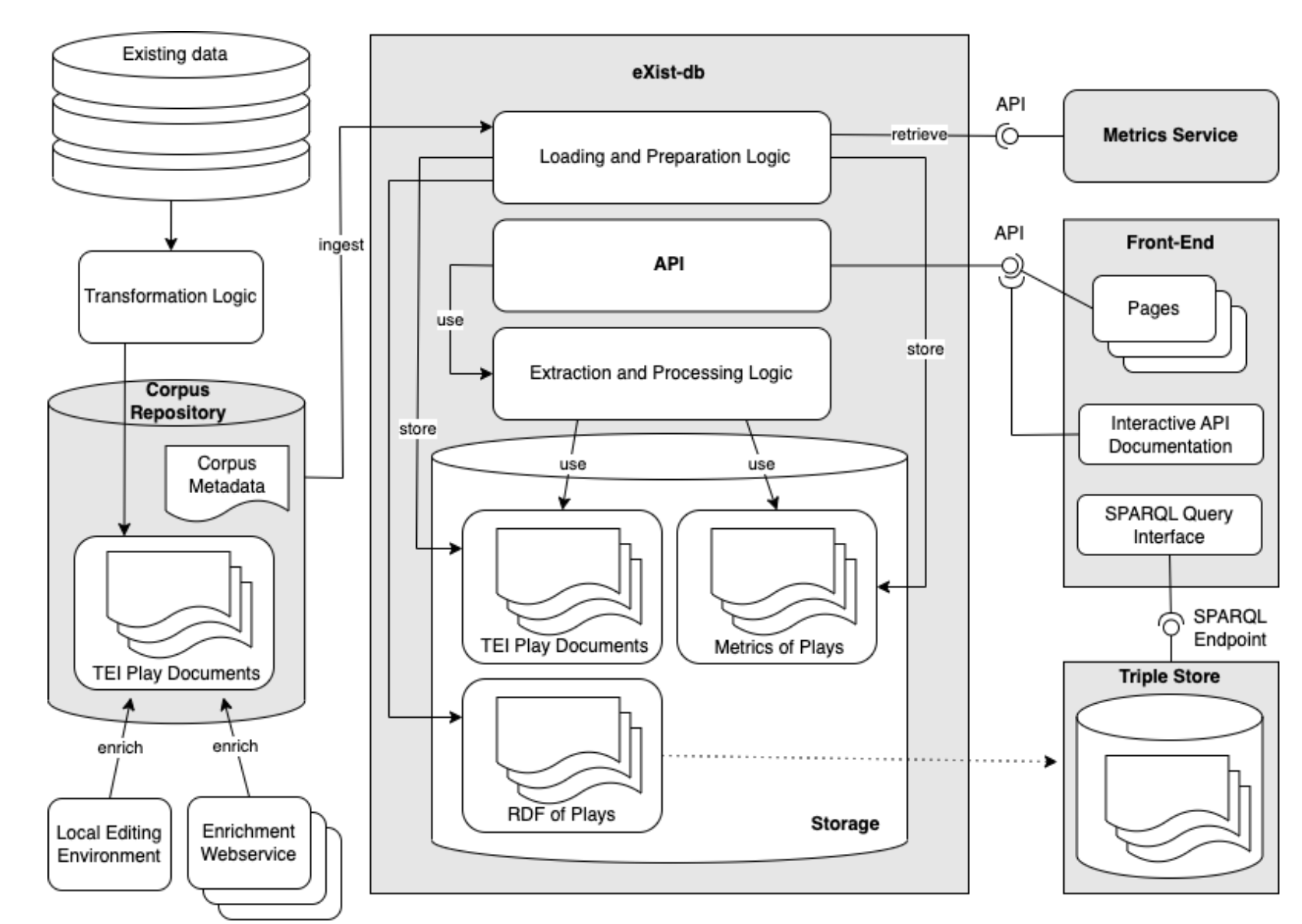
Fig. 22 Overview of the DraCor system. Corpus data flows from GitHub repositories into the eXist-db database, where the API provides access. The Metrics Service computes network metrics and the Triple Store holds RDF representations accessible via SPARQL.#
Let us walk through the main components:
Corpus repositories on GitHub. The source data — TEI-encoded play documents and corpus metadata — is curated in GitHub repositories under the dracor-org organisation. Each corpus (GerDraCor, RusDraCor, etc.) has its own repository. GitHub provides version control via Git, issue tracking for community discussions, and a transparent development history. This is also where corpus contributors submit new plays or corrections via pull requests. It is worth noting a tension here: DraCor is committed to open science and open source, yet it relies on GitHub — a commercial platform owned by Microsoft — for hosting its code and data. This is a pragmatic choice (GitHub is where the community still is, and its features for collaboration are hard to match), but it means that a core part of the infrastructure depends on a proprietary service. This is not unique to DraCor; it is a widespread dependency in open-source projects and in Digital Humanities more broadly, and one that the community should remain aware of.
eXist-db and the DraCor API. At the core of the system sits eXist-db, an open-source XML database widely used in Digital Humanities. The DraCor API is implemented as an eXist-db application (GitHub repository), written in XQuery using the RESTXQ framework. XQuery is a query language designed for XML data — it is the natural choice for working with TEI-encoded texts, though it is uncommon outside the humanities and XML communities. When corpora are loaded into eXist-db, the extraction and processing logic of the API parses the TEI documents, extracts metadata, character information, spoken text, stage directions, and other layers, and makes them available through the endpoints we explored in Chapter 5.
The X technology stack
DraCor is built on what is sometimes called the “X technology stack” — a set of XML-based technologies common in Digital Humanities: XML as the data format, TEI as the encoding standard, XSLT for transformations, XQuery for database queries and API logic, RELAX NG for schema validation, and ODD for documenting TEI customisations (see Chapter 3). While this stack is less common in mainstream software development, it is well-suited for working with richly structured textual data in the humanities.
The Metrics Service. Network metrics (density, diameter, average path length, etc.) are not computed by the eXist-db application itself but by a separate service — the Metrics Service, written in Python (GitHub repository). During the ingest of a play, the API extracts the co-presence network from the TEI structure and sends it to the Metrics Service, which calculates the network metrics and returns them. These pre-calculated metrics are then stored in the XML database. This is an example of a microservice architecture: rather than one monolithic application doing everything, specialised services handle specific tasks and communicate via APIs.
The front-end. The web interface at dracor.org is a React application — a JavaScript-based single-page application that communicates with the DraCor API. As we learned in Chapter 5, the front-end is itself an API client: every page, every tab, every download button sends requests to the API and displays the results. The front-end code is maintained in its own GitHub repository.
The Triple Store. DraCor also generates RDF (Resource Description Framework) representations of plays and their metadata, which are stored in a Triple Store (Apache Jena Fuseki). This provides a SPARQL endpoint for linked data queries — connecting DraCor data to the broader Linked Open Data cloud, including Wikidata. We do not cover SPARQL in this textbook — the linked data layer is currently the least developed part of the DraCor system and still evolving. But it is worth knowing that this component exists and points toward a future in which DraCor data can be queried in relation to external knowledge bases.
Reuse of the technology stack. The DraCor system is not limited to drama. The same technology stack has been adapted for other domains: EcoCor applies it to texts relevant for ecocriticism, and an ELTeC corpus explorer uses it for the European Literary Text Collection (prose). Adapting DraCor for a new domain requires working with the XQuery code — a step beyond what this textbook covers, but one that the open-source nature of the project makes possible.
4.3. The Ecosystem: People and Community#
Infrastructure is not only technology — it is also the people who build, maintain, and use it. DraCor is maintained by a core team of editors and technical leads, and each corpus has its own editors and contributors — scholars who curate the TEI-encoded plays, often as part of their own research.[1]
Infrastructure development in the humanities is inherently interdisciplinary, requiring expertise from humanists, technologists, and data curators alike. The role of the technical lead — in DraCor’s case, Carsten Milling — deserves particular attention. Without continuous maintenance — updating dependencies, fixing bugs, adapting to new server environments, responding to community needs — the platform would quickly become unusable. This kind of work is often invisible but essential.
DraCor is explicitly an open-source project — everybody is welcome to contribute. Community interaction happens through several channels: GitHub (for issues, pull requests, and technical discussions), a Mattermost server hosted by the University of Potsdam (for informal communication), social media (primarily Bluesky), and an email list. This community dimension is not incidental; it is what allows the corpora to grow organically, following the “natural growth” principle that Aaron Swartz described and that the Programmable Corpora concept embraces [BornerT23].
5. Practical Examples: Running DraCor Locally#
In the previous sections we looked at DraCor from the outside — its components, its community, its place in the European infrastructure landscape. Now we turn to practice. Because DraCor is open source and its services are published as Docker images, we are not limited to using the production instance at dracor.org. We can run the entire system on our own machine — the same API, the same front-end, the same metrics service — and use it for our own purposes: testing a corpus we are building, working with custom data, or simply exploring how the system works from the inside.
Technical note
The following sections involve working with the terminal (also called command line or shell) — a text-based interface for running commands on your computer. On macOS, this is the Terminal application; on Linux, a terminal emulator; on Windows, PowerShell or the Command Prompt. Some commands shown here (particularly curl) may behave slightly differently on Windows. If you are on Windows and encounter issues, using the terminal inside WSL 2 (Windows Subsystem for Linux) — which you will need for Docker anyway — is recommended.[2]
5.1. Why Run DraCor Locally?#
There are several practical reasons to set up a local DraCor instance:
Independence. A local instance does not depend on the dracor.org server being available — although its uptime is generally good. You can work offline and without being affected by changes to the production system.
Testing your own corpus. If you are developing a new corpus of TEI-encoded plays (see Chapter 3), you can load it into a local DraCor to see how it looks in the front-end and how the API processes it — before contributing it to the community.
Working with custom data. You may want to work with plays that are not (yet) on dracor.org, or with a specific subset of plays for a particular research question.
Controlling the data version. DraCor corpora are “living corpora” — they change over time as plays are added, corrected, or re-encoded [BornerT24]. The data on dracor.org can change without further notice — corpora are updated, plays added or corrected — and as a user, you do not know when this happens. A local instance lets you work with a specific, known version of the data.
Reproducibility. If we want to ensure that our research can be reproduced, we need a way to freeze the state of both the data and the software at a specific point in time. As Andrew Piper noted about his own computational analyses in the foreword to his book “Enumerations” addressing the reproducibility challenges, code “works, at least as of today” [BornerTM+23] — but “today” passes. A local DraCor instance, captured as a Docker image, preserves both the data and the infrastructure together, so that the same analysis can be re-run under the same conditions — as demonstrated in [TUBorner+24], where a Dockerised DraCor environment was used to ensure the reproducibility of a network-analytic study across thousands of plays in a custom “Very Big Drama Corpus” (VeBiDraCor).
The reproducibility challenge in CLS
The question of reproducibility in Computational Literary Studies has received increasing attention. Nan Z. Da’s critique of CLS in 2019 pointed out cases where results could not be reproduced []. Christof Schöch developed a comprehensive framework for “repetitive research” — distinguishing replication, reproduction, revision, and other forms — and concluded that there are “serious and relevant challenges for the field” []. The living nature of DraCor corpora adds another dimension: even with the same code, results may change if the underlying data has been updated. For a detailed discussion and practical solutions, see [BornerT24].
5.2. What Is Docker?#
We have mentioned Docker several times now — as the technology behind the local deployment of DraCor, and as the mechanism that made the VeBiDraCor study reproducible. But what is it, exactly?
Docker is a tool for creating and running containers — lightweight, portable environments that bundle an application together with everything it needs to run: its code, its libraries, its configuration. A container is like a self-contained package: if it runs on one machine, it will run on another, regardless of what operating system or software is installed on the host.
This is different from simply downloading and running code. If we tried to install the components of DraCor manually — eXist-db, the XQuery application, the Python Metrics Service, the React front-end, the Triple Store — we would need to manage numerous dependencies, configure services to communicate with each other, and resolve conflicts with other software on our machine. The XML database eXist-db alone, for example, requires a specific version of Java — and managing Java versions across different applications is a well-known source of frustration. Docker abstracts all of this away: each container carries its own dependencies, so we do not need to install Java, Python, or Node.js on our system.
Two key concepts:
An image is a snapshot of an application and everything it needs — frozen in a file that can be shared and reused. DraCor publishes images for its services on Docker Hub:
dracor/api,dracor/frontend,dracor/metrics, anddracor/fuseki.A container is what happens when we run an image — a live, working copy of the application. We can start, stop, and inspect containers.
Docker Compose allows us to define and run multiple containers together — think of it as a blueprint that specifies which services to start, how they connect, and in what order. This is exactly what we need for DraCor, since the system consists of several services that need to communicate with each other.
This combination of Docker and Compose is what makes sharing and documenting a DraCor setup so lightweight. Since the images are already published on Docker Hub, all we need to share is the Compose file — a small text file that contains all the information needed to start and orchestrate the services. Anyone with Docker installed can take that file, run docker compose up, and have the same system running on their machine. This also means that any adaptations we make to our local setup — adding a service, changing a configuration — are documented in the Compose file itself rather than in our memory.
A transferable skill
Containerisation is not unique to DraCor or to Digital Humanities. It is a core practice in modern software development and “DevOps” — the discipline of managing the deployment and operation of applications [BornerT24]. Understanding Docker here means recognising the same patterns when encountering them in industry contexts or other research infrastructure.
5.3. Setting Up a Local DraCor Instance#
The DraCor API repository on GitHub contains everything we need to run DraCor locally.[3] The following steps assume that Docker is installed and running on your machine. On macOS and Linux, installation is usually straightforward. On Windows, Docker requires the Windows Subsystem for Linux (WSL 2) to be enabled, which can be an additional hurdle — consult the Docker documentation if you encounter issues.
Step 1: Clone the repository.
We need a local copy of the DraCor API code. For this, we use Git — a version control system that tracks changes to files over time. Git is widely used in software development and in Digital Humanities for managing both code and data (the corpora of DraCor are also managed with Git). If Git is not yet installed on your system, see the official installation guide.[4] The command git clone creates a local copy of a repository on your machine. The cd command enters the newly created folder:
git clone https://github.com/dracor-org/dracor-api.git
cd dracor-api
Step 2: Start the services.
The repository contains a compose.yml file that defines all the services DraCor needs. We start them with a single command:
EXIST_PASSWORD= docker compose up
Setting EXIST_PASSWORD= (empty) disables the admin password for the local instance, which is convenient for development. The first time you run this, Docker will download the necessary images — this may take a few minutes.
Once the services are running, we can verify that the API is operational. Note that http://localhost:8088/api/v1/ is now the base URL for our local API — the equivalent of https://dracor.org/api/v1/ that we used throughout Chapter 5. Everything we learned there — calling endpoints with curl, Python requests, or PyDraCor — works the same way with this local URL:
curl http://localhost:8088/api/v1/info
The front-end is now available at http://localhost:8088. It looks the same as dracor.org — but it is running entirely on your machine, and it is empty: no corpora are loaded yet.
5.4. Loading a Corpus#
An empty DraCor is not very useful. Let us load a corpus. The DraCor API provides admin endpoints for this purpose — the same endpoints we briefly mentioned in Chapter 5 but did not use, because they require authentication. On the production server, only the administrators have these credentials. On our local instance, however, we set the password ourselves (or left it empty), so we can use these admin endpoints to manage our local DraCor.
Adding a corpus is a two-step process: first, we register the corpus by sending its metadata to the API; then, we trigger the loading of the actual play data. Let us walk through both steps.
Step 1: Register the corpus.
We first register a new corpus by sending its metadata (as an XML document) to the API. Each DraCor corpus repository on GitHub contains a corpus.xml file with this metadata. We can download it directly using the raw file URL that GitHub provides — a URL that serves the plain file content rather than the GitHub web page. For example, to add TestDraCor, a small corpus for testing purposes:
curl https://raw.githubusercontent.com/dracor-org/testdracor/main/corpus.xml | \
curl -X POST -u admin: -d@- -H 'Content-type: text/xml' \
http://localhost:8088/api/v1/corpora
The first curl downloads the corpus metadata from GitHub; the pipe (|) passes it to the second curl, which sends it to our local API. Note the new flags: -X POST tells curl to use the POST method instead of GET — because we are creating a new resource, not just retrieving data (recall the HTTP methods we introduced in Chapter 5). -u admin: provides the admin credentials (username “admin”, empty password). -d@- reads the data from the pipe. -H 'Content-type: text/xml' tells the API that we are sending XML data. This is similar to the content negotiation we discussed in Chapter 5, but here we specify the format of what we send, not what we want to receive.
Step 2: Trigger loading.
Next, we tell the API to load the play data from the GitHub repository of the corpus:
curl -X POST -u admin: -H 'Content-type: application/json' \
-d '{"load":true}' http://localhost:8088/api/v1/corpora/test
Once the loading is complete, we can check that the plays are available by querying the API:
curl http://localhost:8088/api/v1/corpora/test | jq
Here, jq is an optional command-line tool that formats JSON output for readability. If it is not installed, curl http://localhost:8088/api/v1/corpora/test works just as well — the output will simply not be indented. Alternatively, we can paste the URL directly into a browser to see the response.
If we refresh the front-end at http://localhost:8088, we should also see the corpus with its plays — just as we would on dracor.org.
The same two-step process works for any DraCor-compatible corpus hosted on GitHub. To load GerDraCor, for example, we would use its corpus metadata from the gerdracor repository. We can also load our own TEI files — if we have encoded plays following the DraCor TEI conventions (see Chapter 3), we can upload them through the admin API.
In Python with requests, we simply set the base URL to our local instance:
API_URL = "http://localhost:8088/api/v1/"
And with PyDraCor:
from pydracor import DraCorAPI
dracor = DraCorAPI(host="http://localhost:8088/api/v1")
Everything we learned in Chapter 5 — listing corpora, retrieving plays, getting metrics, filtering spoken text — works exactly the same way with the local instance.
5.6. Beyond Using: Adapting DraCor#
In this chapter, we loaded existing DraCor corpora into a local instance. But the open-source nature of the system also makes it possible to go further: adapting the DraCor technology stack for entirely different collections of texts. Projects like EcoCor (Prose Corpora for Ecocriticism) and the ELTeC corpus explorer (European Literary Text Collection Corpora of Novels) have done exactly this — reusing the eXist-db application, API and front-end of DraCor for their own purposes. Adapting DraCor at this level involves working with the XQuery code and the TEI customisation, which is beyond the scope of this textbook. But knowing that it is possible — and that the codebase is open for it — is part of understanding DraCor as infrastructure: not a fixed product, but a platform that can evolve with the needs of the research community.
6. Exercises#
Self-test
Open the Self-test: Infrastructure.
7. Teaching Notes#
This chapter can be taught as a 60–90 minute conceptual workshop before any technical setup is attempted. A good entry point is to ask students what they normally do not see when they use DraCor: repositories, XML databases, API logic, metrics services, front-end code, contributors, maintenance work, and funding structures. Lecturers can then organise students into small groups and give each group a set of “infrastructure cards” representing components such as TEI files, GitHub repositories, eXist-db, the DraCor API, the Metrics Service, the front-end, the Triple Store, Docker, corpus editors, and users. Students arrange the cards into a data-flow diagram and annotate where interpretation, transformation, or possible failure enters the system. The closing discussion can return to the chapter’s main point: infrastructure is not neutral background, but a socio-technical system that shapes what researchers can see, retrieve, compare, and reproduce.
Lecturers may also teach this chapter as a practical Docker lab, ideally in a 120-minute session or a longer workshop. The instructor should prepare the technical environment carefully in advance and provide a fallback option, such as an instructor-led demonstration, a shared machine, or screenshots of a successful local instance, because Docker setup problems can otherwise dominate the session. Students can work in pairs and keep an “infrastructure log” documenting each command, expected result, actual result, error message, and solution. After starting a local DraCor instance, they should compare one request against dracor.org and the same request against localhost, then discuss what changes when data and software are under their own control. The final task can be a short reproducibility note: students identify which elements would need to be documented or preserved so that another researcher could repeat their work later, including data version, software image, configuration file, API endpoint, and analysis code.
8. Further Reading and Resources#
DraCor API repository and setup instructions: dracor-org/dracor-api
Reproducible research with Docker notebook: dracor-notebooks on GitHub
Docker documentation: https://docs.docker.com/
Sherratt, T. (2015). “Towards a Manifesto for Tactical DH Research Infrastructure.” YouTube
DARIAH Campus: https://campus.dariah.eu/
SSH Open Marketplace: https://marketplace.sshopencloud.eu/
9. Glossary Entries#
Term |
Definition |
|---|---|
Research infrastructure |
A system of tools, services, data, and people that supports research activities. In the humanities, often a socio-technical system rather than a purely technical one. |
Tactical infrastructure |
An approach to infrastructure that grows bottom-up from researcher needs, rather than being imposed as a centralised platform (term introduced by Sherratt 2015). |
eXist-db |
An open-source XML database used as the core of the DraCor system. |
XQuery |
A query and programming language for XML databases. The DraCor API is written in XQuery. |
Microservice |
A small, specialised service that handles a specific task and communicates with other services via APIs. The DraCor Metrics Service is an example. |
Docker |
A platform for building and running containers — lightweight, portable environments that bundle an application with its dependencies. |
Container |
A running instance of a Docker image — an isolated environment containing an application and everything it needs to run. |
Image |
A read-only template (blueprint) from which Docker containers are created. DraCor images are published on Docker Hub. |
Docker Compose |
A tool for defining and running multi-container applications. DraCor uses it to orchestrate its services. |
Living corpus |
A corpus that changes over time — plays are added, corrected, or re-encoded. This creates challenges for reproducibility. |
DevOps |
A set of practices combining software development and IT operations, often involving containerisation and automated deployment. |
Git |
A distributed version control system that tracks changes to files over time. The corpora and code of DraCor are managed with Git. |
GitHub |
A web-based platform for hosting Git repositories. DraCor uses it for code, corpora, and community collaboration. Owned by Microsoft. |
Repository |
A project folder managed by Git, containing files and their full change history. |
Terminal (command line) |
A text-based interface for running commands on a computer. Called Terminal on macOS, and PowerShell or Command Prompt on Windows. |
|
A command-line tool for sending HTTP requests — used in this textbook to interact with the DraCor API. |
SPARQL |
A query language for querying RDF (Linked Data). DraCor provides a SPARQL endpoint but this is not covered in this textbook. |
RDF (Resource Description Framework) |
A standard for representing data as linked triples (subject–predicate–object), used for connecting data to the Linked Open Data cloud. |
Open source |
Software whose source code is publicly available and can be freely used, modified, and distributed. DraCor is an open-source project. |
ERIC (European Research Infrastructure Consortium) |
A legal framework for establishing and operating European research infrastructures. CLARIN and DARIAH are ERICs. |
Docker Hub |
A cloud-based registry for sharing Docker images. DraCor publishes its service images there. |
10. Next Steps#
Having explored the infrastructure of DraCor, readers can continue with Chapter 7, which discusses the DraCor Textbook as a living and collaborative resource. They may also experiment with a local instance by loading a small corpus and repeating an API request from Chapter 5.
11. AI Use Declaration#
This chapter was drafted with the assistance of a large language model (Claude, Anthropic). The author dictated content via voice input, which was used as the basis for an interview-style dialogue with the LLM. The model structured and edited the spoken input into chapter prose. A retrieval-augmented generation (RAG) system containing key literature on DraCor and CLS infrastructure was used to retrieve relevant passages and verify factual claims. A summary of the CLS INFRA project proposal and strategic roadmap, generated with the assistance of an LLM, was used as source material. All content was reviewed and edited by the author.
13. References#
Ingo Börner and Peer Trilcke. CLS INFRA D7.1 On Programmable Corpora. 2023. doi:10.5281/zenodo.7664964.
Ingo Börner and Peer Trilcke. CLS INFRA D7.3 On Versioning Living and Programmable Corpora: (Executable) Report and Prototypes for Reproducible Research. February 2024. URL: https://zenodo.org/doi/10.5281/zenodo.11081934 (visited on 2026-05-20), doi:10.5281/ZENODO.11081934.
Ingo Börner, Peer Trilcke, Carsten Milling, Frank Fischer, and Henny Sluyter-Gäthje. Dockerizing DraCor – A Container-based Approach to Reproducibility in Computational Literary Studies. In Anne Baillot, Walter Scholger, Toma Tasovac, and Georg Vogeler, editors, DH 2023 Book of Abstracts. University of Graz, Graz, 2023. Zenodo. URL: https://zenodo.org/record/8107836 (visited on 2026-05-20), doi:10.5281/ZENODO.8107836.
Ingo Börner, Peer Trilcke, Daniil Skorinkin, and Luca Giovannini. CLS INFRA D7.4 Report on the Implementation of Programmable Corpora. 2025. doi:10.5281/zenodo.15301341.
Peer Trilcke, Evgeniya Ustinova, Ingo Börner, Frank Fischer, and Carsten Milling. Detecting Small Worlds in a Corpus of Thousands of Theater Plays. In Melanie Andresen and Nils Reiter, editors, Computational Drama Analysis: Reflecting on Methods and Interpretations, pages 7–33. de Gruyter, Berlin, Boston, 2024. doi:10.1515/9783111071824-002.